> ## Documentation Index
> Fetch the complete documentation index at: https://help.kajabi.com/llms.txt
> Use this file to discover all available pages before exploring further.
# Duplicate an Offer
> Duplicate Offers to provide multiple purchasing options and build unique sales pages
**Duplicate an Offer** to create pricing tiers, give more pricing options, or create payment plans, bonus Offers, duplicate Offers with different currencies, and more.
## Why duplicate an Offer?
Duplicating an Offer can provide customers with multiple options for purchasing, from creating multiple pricing tiers with different Product packages to building unique sales pages specific to your business.
Here are a few examples of how you can use duplicated Offers:
* Create "Choose what you pay" or "Donate" sales pages
* [Provide different currency options](/articles/sales/offers/how-to-make-offers-available-in-multiple-currencies)
* [Give your customers different pricing options](/articles/sales/offers/create-multiple-pricing-options-for-legacy-checkout)
And more. Customize the duplicated Offer and give customers more options for purchase.
**Tip:** Create a seamless purchasing experience for your customers by creating a Sales Page with multiple buttons leading to your duplicated Offers. This is a great way to provide multiple currency options or payment plans to your customers. Check out [How to Create Different Pricing Options](/articles/sales/offers/create-multiple-pricing-options-for-legacy-checkout) for an example.
## Duplicate an Offer
1. Open the **Sales** tab from your Dashboard
2. Then, click **Pricing**
3. Locate the Offer you want to duplicate and click the `…` icon
4. Select **Duplicate**
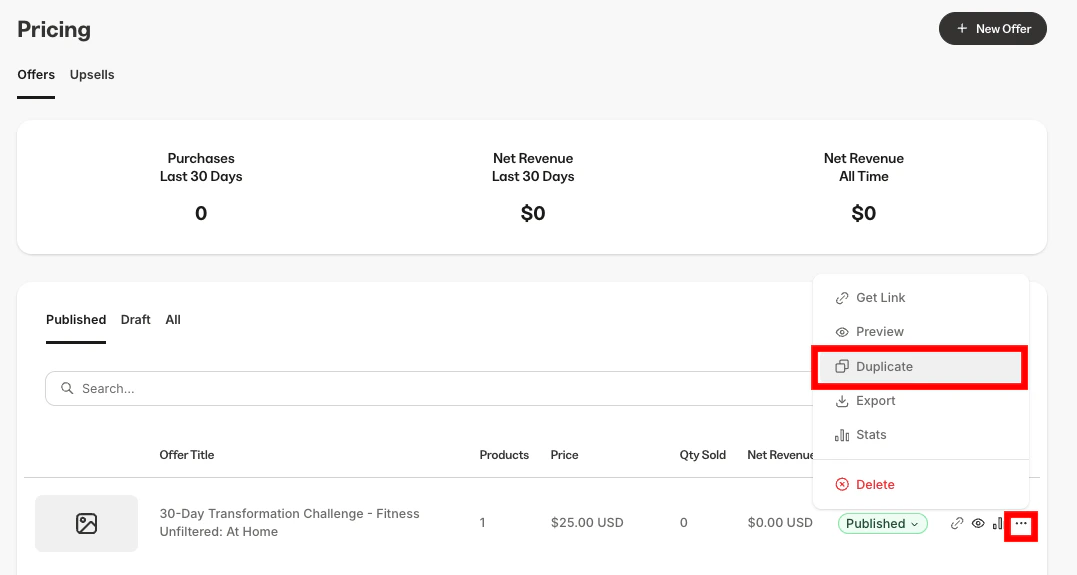 The duplicated Offer will be created with the same name as the original, but with a number next to it based on what number duplicate it is.
5. After duplicating, click the **Offer title** to edit its details, Products, and other settings
6. Be sure to click **Save** to keep your changes
**Note:** If the original Offer is attached to a [coupon](/articles/sales/coupons/how-to-create-a-coupon), your duplicated Offer will also be connected to the coupon.
## Duplicate an Offer with Automations
Add one of many different types of Automations to Offers so that the selected Automation action is performed immediately after an Offer is purchased.
Read more about [Kajabi Automations](/articles/marketing/automations/automations-overview).
After creating an Offer with Automations, you can duplicate it.
### Add an Automation to an Offer
1. From your Kajabi Dashboard, select the **Sales** tab
2. Under **Pricing**, select the Offer you wish to edit
3. Click the **Purchase flow** tab
4. Scroll down to the **Automations** section
5. Click **+Add Automation**
6. Using the **Then** drop-down menu, select the Automation action to be performed when the offer is purchased
7. If your Kajabi plan includes [Advanced Automations](/articles/marketing/automations/basic-vs-advanced-automations), you may choose to **Add Conditions** to the Automation
8. Click **Save** to complete the Offer Automation setup process
### Duplicate an Offer and its Automations
1. Open the **Sales** tab from your Dashboard
2. Then, click **Pricing**
3. Locate the Offer you want to clone and click the `…` icon
4. Select **Duplicate**
5. Click the **Copy Automations** checkbox
6. Press **Duplicate** to Duplicate the Offer and its Automations
The duplicated Offer will be created with the same name as the original, but with a number next to it based on what number duplicate it is.
5. After duplicating, click the **Offer title** to edit its details, Products, and other settings
6. Be sure to click **Save** to keep your changes
**Note:** If the original Offer is attached to a [coupon](/articles/sales/coupons/how-to-create-a-coupon), your duplicated Offer will also be connected to the coupon.
## Duplicate an Offer with Automations
Add one of many different types of Automations to Offers so that the selected Automation action is performed immediately after an Offer is purchased.
Read more about [Kajabi Automations](/articles/marketing/automations/automations-overview).
After creating an Offer with Automations, you can duplicate it.
### Add an Automation to an Offer
1. From your Kajabi Dashboard, select the **Sales** tab
2. Under **Pricing**, select the Offer you wish to edit
3. Click the **Purchase flow** tab
4. Scroll down to the **Automations** section
5. Click **+Add Automation**
6. Using the **Then** drop-down menu, select the Automation action to be performed when the offer is purchased
7. If your Kajabi plan includes [Advanced Automations](/articles/marketing/automations/basic-vs-advanced-automations), you may choose to **Add Conditions** to the Automation
8. Click **Save** to complete the Offer Automation setup process
### Duplicate an Offer and its Automations
1. Open the **Sales** tab from your Dashboard
2. Then, click **Pricing**
3. Locate the Offer you want to clone and click the `…` icon
4. Select **Duplicate**
5. Click the **Copy Automations** checkbox
6. Press **Duplicate** to Duplicate the Offer and its Automations