> ## Documentation Index
> Fetch the complete documentation index at: https://help.kajabi.com/llms.txt
> Use this file to discover all available pages before exploring further.
# Orders Overview
The Orders tab in Payments gives you a unified view of every purchase that went through checkout. Each row represents one completed checkout session, grouping the primary offer, selected order bumps, and accepted upsells into a single Order.
This feature is currently in closed beta. If enabled for your account and you run into any issues, contact [payments.support@kajabi.com](mailto:payments.support@kajabi.com).
## **What is an Order?**
An **Order** is a record of everything a customer purchased at checkout: the primary offer, any order bumps, and any upsells or downsells. Each item in an Order maps to an offer with its associated products, billing details, and transactions.
Here's how different offer types appear within an Order:
* **One-time offers:** Appear as a single line item. The Order is marked Complete as soon as payment succeeds.
* **Subscriptions:** The initial charge is part of the Order. The Order is marked Complete once the initial charge succeeds, including the initial trial creation. Subscription renewals are not part of the Order as they are part of an indefinite commitment; they live on the Subscription Details page, accessible directly from the Order detail page.
* **Payment plans:** All installments are part of the Order, as they represent the full committed value of the offer. Both completed and upcoming installment charges are visible on the Order detail page. The Order stays In Progress until all installments are collected.
* **Free or fully-discounted offers:** Included in the Order and marked Complete immediately, since no payment is required.
* **Order bumps, upsells, and downsells:** Appear as line items within the Order detail page. They don't create separate rows on the Orders page; everything from the same checkout, including upsells accepted afterward, rolls up into one Order.
* **Cart purchases and paid invoices:** Also appear as Orders. An invoice becomes an Order once it's paid.
Each Order is assigned a unique Order number that appears on receipts, confirmation emails, and webhook payloads. Numbering starts at #1000 for new sites; for sites with existing order history from Cart or Invoicing, the sequence continues from where it left off.
Orders appear in **Pricing** > **Payments** > **Orders**.
Order data collection began between June 25–29, 2026. The exact start date varies by account. Purchases made before your account's collection date are not included on the Orders page and remain accessible on the Transactions page.
 ## **Order stats**
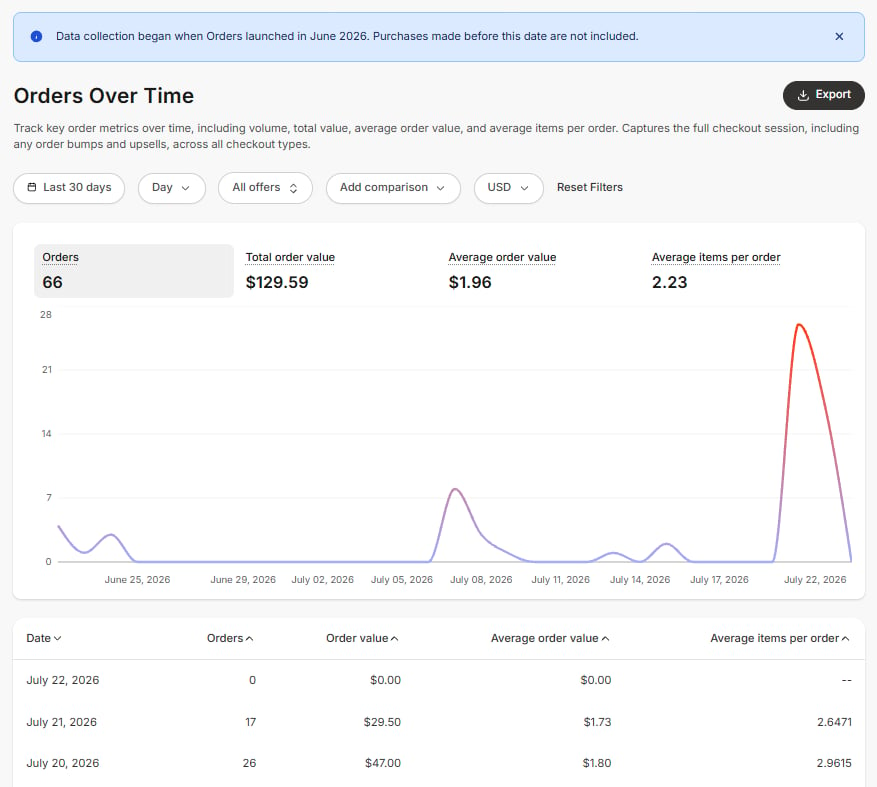
At the top of the Orders page, three stat cards summarize your order activity for the last 30 days:
* **Total order value** and **Average order value** include only orders placed in your site's default currency. Orders placed in other currencies are not counted toward these two figures. Both use each order's full committed value, so payment plans are counted at their full amount, including all future installments.
* **Purchases** counts every order in the period, across all currencies.
On a site that sells in more than one currency, the Purchases count can be higher than what the Total and Average order value figures reflect, since those two are limited to your default currency.
For a deeper breakdown of these metrics over time, see [Report: Orders Over Time](https://help.kajabi.com/articles/analytics/report-orders-over-time).
## **Order statuses**
An Order can have one of three statuses:
* **In Progress**: One or more payments are still being collected. For example: a payment plan with installments still to come, or a one-time ACH payment awaiting settlement.
* **Complete**: All expected payments have been collected. Applies immediately to one-time purchases on successful charge; to payment plans once all installments are collected; to subscriptions once the initial charge succeeds (renewals do not affect this status); and to orders containing only free or fully-discounted offers.
* **Canceled**: All payment obligations in the Order have been canceled or could not be collected.
When an Order contains multiple items, status rolls up as follows: if any item is still in progress, the Order is **In Progress**; if none are in progress but at least one is complete, the Order is **Complete**; the Order is **Canceled** only when every item is canceled. An Order with a mix of completed and canceled items stays Complete. A subscription canceling after an Order is already Complete does not change the Order status.
### **Details indicators**
Alongside the status, the **Details** column surfaces additional context:
* **Billing status** for each subscription or payment plan line item: *trialing*, *active*, *paused*, *past due*, *pending cancellation*, or *canceled*. A *past due* indicator means a charge has failed and not yet recovered. These reflect the current billing state of recurring items and appear in addition to the Order status.
* **Refunds:** When any amount on the Order has been refunded, a "refunded" indicator shows the amount returned. Refunds do not change the Order status. Use the **Refunded** filter to find Orders that include a refund.
## **Order details**
Clicking any row on the Orders page opens the Order detail page.
## **Order stats**
At the top of the Orders page, three stat cards summarize your order activity for the last 30 days:
* **Total order value** and **Average order value** include only orders placed in your site's default currency. Orders placed in other currencies are not counted toward these two figures. Both use each order's full committed value, so payment plans are counted at their full amount, including all future installments.
* **Purchases** counts every order in the period, across all currencies.
On a site that sells in more than one currency, the Purchases count can be higher than what the Total and Average order value figures reflect, since those two are limited to your default currency.
For a deeper breakdown of these metrics over time, see [Report: Orders Over Time](https://help.kajabi.com/articles/analytics/report-orders-over-time).
## **Order statuses**
An Order can have one of three statuses:
* **In Progress**: One or more payments are still being collected. For example: a payment plan with installments still to come, or a one-time ACH payment awaiting settlement.
* **Complete**: All expected payments have been collected. Applies immediately to one-time purchases on successful charge; to payment plans once all installments are collected; to subscriptions once the initial charge succeeds (renewals do not affect this status); and to orders containing only free or fully-discounted offers.
* **Canceled**: All payment obligations in the Order have been canceled or could not be collected.
When an Order contains multiple items, status rolls up as follows: if any item is still in progress, the Order is **In Progress**; if none are in progress but at least one is complete, the Order is **Complete**; the Order is **Canceled** only when every item is canceled. An Order with a mix of completed and canceled items stays Complete. A subscription canceling after an Order is already Complete does not change the Order status.
### **Details indicators**
Alongside the status, the **Details** column surfaces additional context:
* **Billing status** for each subscription or payment plan line item: *trialing*, *active*, *paused*, *past due*, *pending cancellation*, or *canceled*. A *past due* indicator means a charge has failed and not yet recovered. These reflect the current billing state of recurring items and appear in addition to the Order status.
* **Refunds:** When any amount on the Order has been refunded, a "refunded" indicator shows the amount returned. Refunds do not change the Order status. Use the **Refunded** filter to find Orders that include a refund.
## **Order details**
Clicking any row on the Orders page opens the Order detail page.
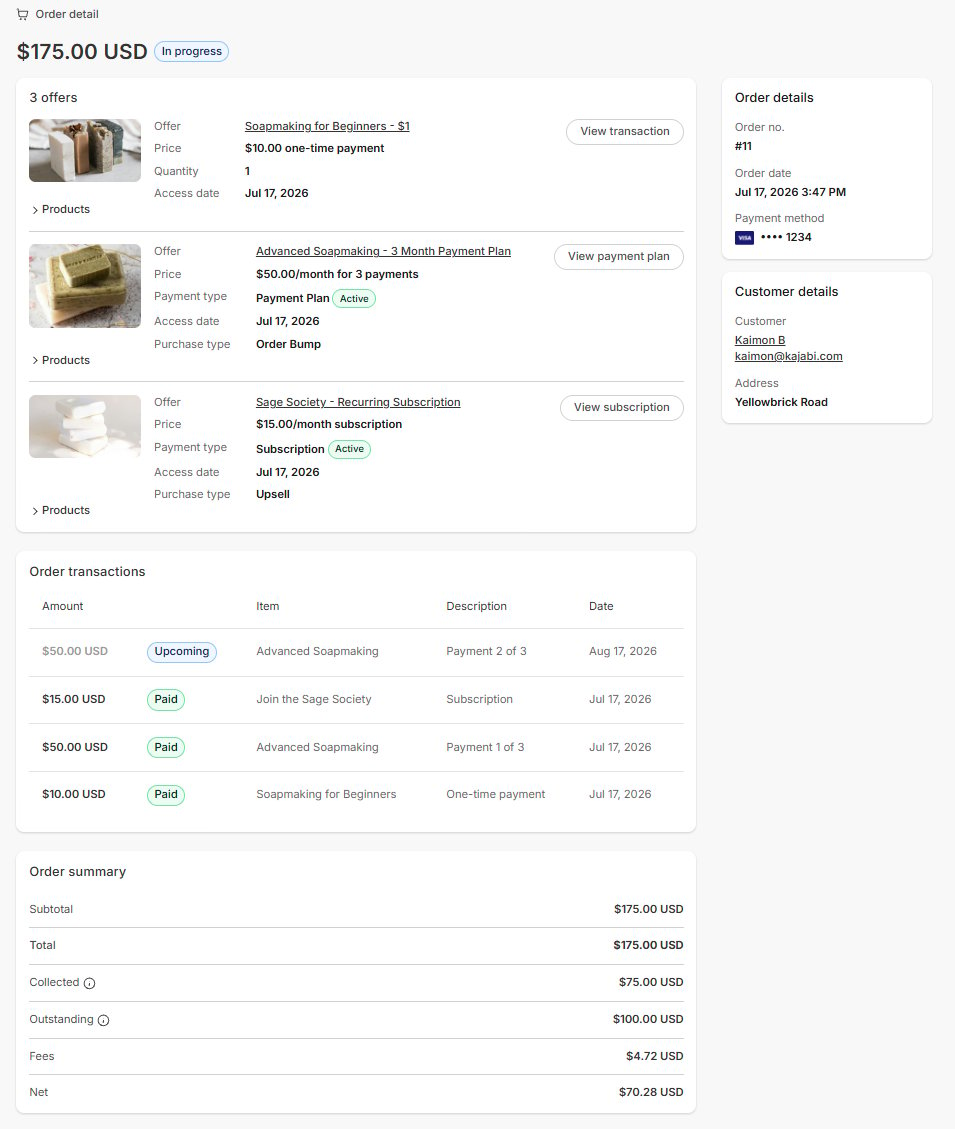 The page includes:
* **Offer purchases:** Each offer in the Order, with pricing type, billing status, and links to the associated subscription, payment plan, or transaction
* **Transactions:** All charges from the original purchase, including upcoming and past installments for payment plans, listed by date in descending order. Subscription renewals are not shown here.
* **Order summary:**
* **Subtotal**: Total of all offers in the order before discounts and taxes
* **Total**: Full committed value of the order, including all future payment-plan installments
* **Setup Fees**: One-time setup fee charged on top of a subscription or payment plan
* **Taxes**: Any sales tax applied to the order
* **Collected**: Total amount received across all payments to date
* **Outstanding**: Remaining balance still due on active payment plans
* **Discounts**: The amount deducted by a coupon or discount
* **Fees**: Payment processing fees on the payments collected so far
* **Net**: Collected minus Fees
* **Order details:** Order number, date, and payment method
* **Customer details:** Member information and any contact info collected at checkout
## **Webhooks**
If your workflows rely on the **Payment Succeeded** or **Purchase Created** webhooks (for example, through a Zapier integration or a custom integration), review how these events are structured with multiple order bumps and Orders.
One-time offers and one-time order bumps are grouped into a single transaction. The **Payment Succeeded** webhook fires once per transaction rather than once per offer, and offer fields in that event contain comma-separated values when multiple offers are included. The **Purchase Created** webhook fires once per offer, but transaction-level amount fields reflect the full transaction total rather than the individual offer price.
The `offer` field on the Transactions API endpoint does not return data for bundled offers. Use the `purchases` relationship instead.
For full details and payload examples, see [Webhook and API changes with the introduction of multiple order bumps and Orders](https://help.kajabi.com/articles/api-integrations/webhooks/webhook-changes).
## **FAQs**
### **Why don't I see purchases made before June 2026 on my Orders page?**
Order data collection began between June 25–29, 2026, and the exact start date varies by account. Purchases made before your account's collection date are not included on the Orders page. You can still find those transactions o the **Transactions** page.
### **Why does my Order total show a higher amount than what was actually charged?**
The Order total reflects the full committed value, including all future payment plan installments. For example, a 12-month plan at \$100/month shows a total of \$1,200. The **Amount collected** field shows only what has actually been charged to date.
### **Are subscription renewals tracked on the Orders page?**
No. Only the initial purchase is part of the Order. Renewals are visible on the Subscription Details page, which you can access directly from the Order detail page.
### **Why does my site's Purchases count differ from Total order value?**
Total order value and Average order value only count orders placed in your site's default currency. Purchases counts orders across all currencies. If your site accepts multiple currencies, the Purchases count will be higher than what the value figures reflect.
The page includes:
* **Offer purchases:** Each offer in the Order, with pricing type, billing status, and links to the associated subscription, payment plan, or transaction
* **Transactions:** All charges from the original purchase, including upcoming and past installments for payment plans, listed by date in descending order. Subscription renewals are not shown here.
* **Order summary:**
* **Subtotal**: Total of all offers in the order before discounts and taxes
* **Total**: Full committed value of the order, including all future payment-plan installments
* **Setup Fees**: One-time setup fee charged on top of a subscription or payment plan
* **Taxes**: Any sales tax applied to the order
* **Collected**: Total amount received across all payments to date
* **Outstanding**: Remaining balance still due on active payment plans
* **Discounts**: The amount deducted by a coupon or discount
* **Fees**: Payment processing fees on the payments collected so far
* **Net**: Collected minus Fees
* **Order details:** Order number, date, and payment method
* **Customer details:** Member information and any contact info collected at checkout
## **Webhooks**
If your workflows rely on the **Payment Succeeded** or **Purchase Created** webhooks (for example, through a Zapier integration or a custom integration), review how these events are structured with multiple order bumps and Orders.
One-time offers and one-time order bumps are grouped into a single transaction. The **Payment Succeeded** webhook fires once per transaction rather than once per offer, and offer fields in that event contain comma-separated values when multiple offers are included. The **Purchase Created** webhook fires once per offer, but transaction-level amount fields reflect the full transaction total rather than the individual offer price.
The `offer` field on the Transactions API endpoint does not return data for bundled offers. Use the `purchases` relationship instead.
For full details and payload examples, see [Webhook and API changes with the introduction of multiple order bumps and Orders](https://help.kajabi.com/articles/api-integrations/webhooks/webhook-changes).
## **FAQs**
### **Why don't I see purchases made before June 2026 on my Orders page?**
Order data collection began between June 25–29, 2026, and the exact start date varies by account. Purchases made before your account's collection date are not included on the Orders page. You can still find those transactions o the **Transactions** page.
### **Why does my Order total show a higher amount than what was actually charged?**
The Order total reflects the full committed value, including all future payment plan installments. For example, a 12-month plan at \$100/month shows a total of \$1,200. The **Amount collected** field shows only what has actually been charged to date.
### **Are subscription renewals tracked on the Orders page?**
No. Only the initial purchase is part of the Order. Renewals are visible on the Subscription Details page, which you can access directly from the Order detail page.
### **Why does my site's Purchases count differ from Total order value?**
Total order value and Average order value only count orders placed in your site's default currency. Purchases counts orders across all currencies. If your site accepts multiple currencies, the Purchases count will be higher than what the value figures reflect.