> ## Documentation Index
> Fetch the complete documentation index at: https://help.kajabi.com/llms.txt
> Use this file to discover all available pages before exploring further.
# What happens when a customer subscription is canceled
> Understand how canceled subscriptions affect customer access to Products across different payment processors.
Although we wish they didn't, **cancelations** happen. So, what happens if they do?
With the various payment processor options including Kajabi Payments, Stripe, and PayPal, canceled payments may revoke access to the Product(s) included with the purchased Offer.
## Reinstating subscriptions and payment plans
If a subscription or payment plan is canceled—whether due to failed payments or a manual cancellation—it **cannot be reinstated**. This is a security measure to ensure that billing authorizations remain transparent for both you and your customers.
* **To resume billing for a subscription:** The customer must re-purchase the offer.
* **To resume billing for a payment plan:** You can duplicate the original offer, adjust the number of payments to reflect the remaining balance, and send the new checkout link to the customer to resume their schedule.
## Subscription payment cancelation by payment processor
### Kajabi Payments
#### Customer initiated self-cancelations
When you [allow customers to self-cancel their subscription](/articles/contacts/manage-your-contacts/enable-and-disable-customer-subscription-self-cancelations), the subscription will be canceled at the end of their current billing period.
#### Hero initiated cancelations
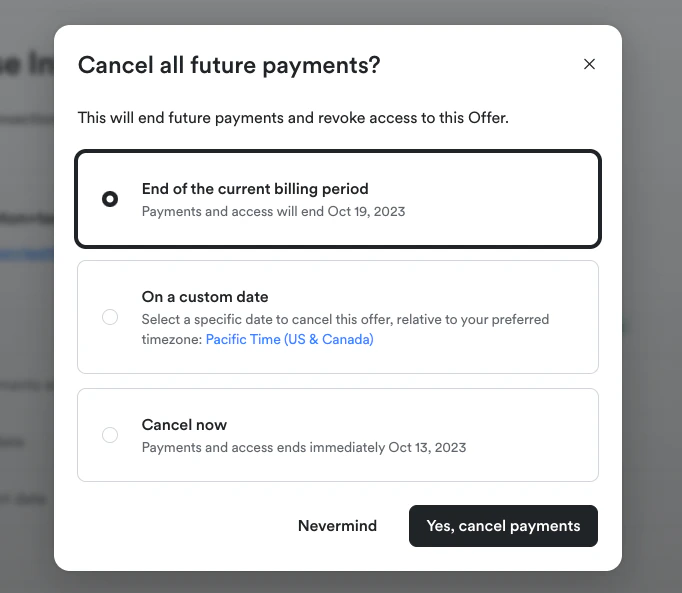
When you, as the business owner, decide to cancel a customer's subscription, you have the flexibility to choose when the cancelation takes effect.
You can select from three options:
* **End of the current billing period**: If you cancel a subscription with time left in the billing period, your customers will have the Offer and Product access until the end of the billing period.
* **On a custom date**: Offer and Product access will remain active until the custom date you select.
* **Cancel now**: If you cancel a subscription immediately, payments will stop, and Offer and Product access will be revoked instantly.
 ### Stripe
There are a few ways to cancel a Stripe subscription.
You can manually cancel your customers' subscriptions through the Kajabi application, through the Stripe dashboard, or allow your customers to cancel themselves through the customer portal.
When a subscription is canceled, the Offer may automatically be revoked and your customer will lose access to the Product(s). [Learn more about how to cancel payments through Stripe](https://stripe.com/docs/refunds#cancel-payment).
#### Canceling a subscription in Kajabi
##### Customer initiated self-cancelations
When you [allow customers to self-cancel their subscription](/articles/contacts/manage-your-contacts/enable-and-disable-customer-subscription-self-cancelations), the subscription will be canceled at the end of their current billing period.
##### Hero initiated cancelations
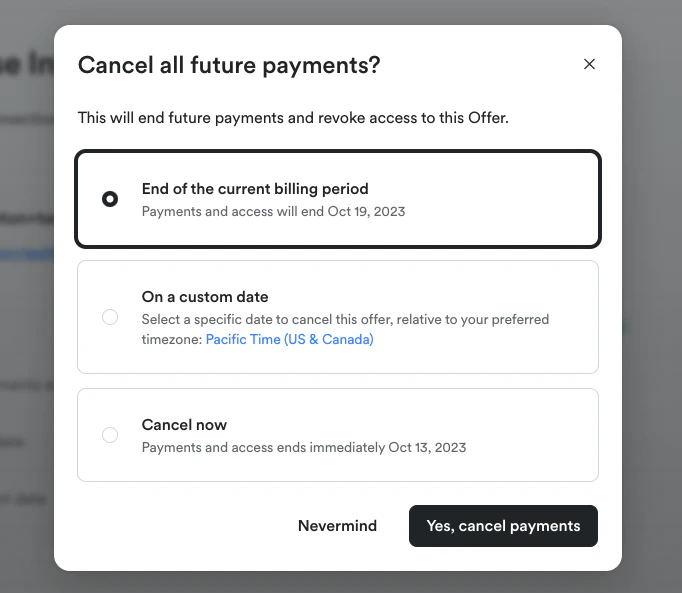
When you, as the business owner, decide to cancel a customer's subscription, you have the flexibility to choose when the cancelation takes effect.
You can select from three options:
* **End of the current billing period**: If you cancel a subscription with time left in the billing period, your customers will have the Offer and Product access until the end of the billing period.
* **On a custom date**: Offer and Product access will remain active until the custom date you select.
* **Cancel now**: If you cancel a subscription immediately, payments will stop, and Offer and Product access will be revoked instantly.
### Stripe
There are a few ways to cancel a Stripe subscription.
You can manually cancel your customers' subscriptions through the Kajabi application, through the Stripe dashboard, or allow your customers to cancel themselves through the customer portal.
When a subscription is canceled, the Offer may automatically be revoked and your customer will lose access to the Product(s). [Learn more about how to cancel payments through Stripe](https://stripe.com/docs/refunds#cancel-payment).
#### Canceling a subscription in Kajabi
##### Customer initiated self-cancelations
When you [allow customers to self-cancel their subscription](/articles/contacts/manage-your-contacts/enable-and-disable-customer-subscription-self-cancelations), the subscription will be canceled at the end of their current billing period.
##### Hero initiated cancelations
When you, as the business owner, decide to cancel a customer's subscription, you have the flexibility to choose when the cancelation takes effect.
You can select from three options:
* **End of the current billing period**: If you cancel a subscription with time left in the billing period, your customers will have the Offer and Product access until the end of the billing period.
* **On a custom date**: Offer and Product access will remain active until the custom date you select.
* **Cancel now**: If you cancel a subscription immediately, payments will stop, and Offer and Product access will be revoked instantly.
 #### Canceling a subscription in the Stripe Dashboard
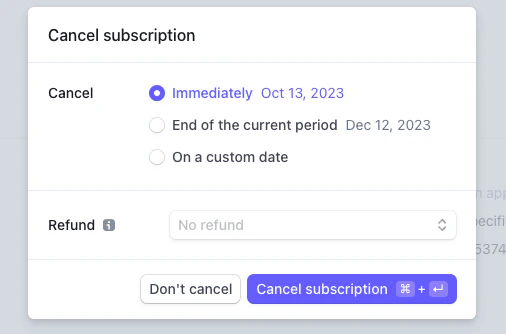
When you cancel a subscription from the Stripe Dashboard, you have the flexibility to choose when the cancelation takes effect.
You can select from three options:
* **Immediately**: If you cancel a subscription immediately, payments will stop, and Offer and Product access will be revoked instantly.
* **End of the current period**: If you cancel a subscription with time left in the billing period, your customer will have Offer and Product access until the end of the billing period.
* **On a custom date**: Offer and Product access will remain active until the custom date you select.
#### Canceling a subscription in the Stripe Dashboard
When you cancel a subscription from the Stripe Dashboard, you have the flexibility to choose when the cancelation takes effect.
You can select from three options:
* **Immediately**: If you cancel a subscription immediately, payments will stop, and Offer and Product access will be revoked instantly.
* **End of the current period**: If you cancel a subscription with time left in the billing period, your customer will have Offer and Product access until the end of the billing period.
* **On a custom date**: Offer and Product access will remain active until the custom date you select.
 [Learn more about how to cancel a subscription with Stripe](/articles/api-integrations/payment-integrations/how-to-cancel-and-refund-a-payment-in-stripe).
### PayPal
#### Canceling a subscription in Kajabi
##### Customer initiated self-cancelations
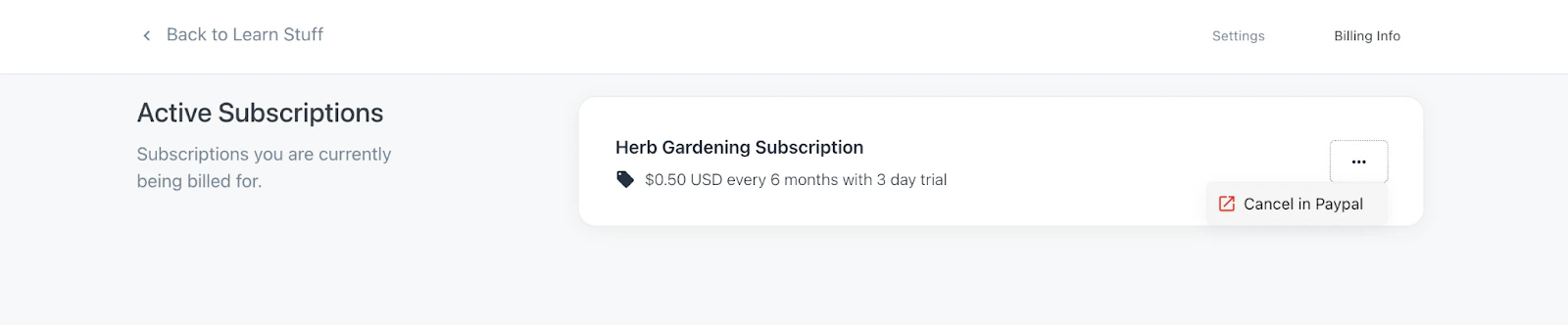
When your customer attempts to cancel a subscription from the billing info page, they will be redirected to log into their PayPal account and cancel their subscription in PayPal:
[Learn more about how to cancel a subscription with Stripe](/articles/api-integrations/payment-integrations/how-to-cancel-and-refund-a-payment-in-stripe).
### PayPal
#### Canceling a subscription in Kajabi
##### Customer initiated self-cancelations
When your customer attempts to cancel a subscription from the billing info page, they will be redirected to log into their PayPal account and cancel their subscription in PayPal:
 [Learn more about how your customers can cancel with PayPal](/articles/contacts/manage-your-contacts/how-to-cancel-your-customers-subscription#h_0aae4dd9-c6af-46ba-bc8e-c18172f287bf).
##### Hero initiated cancelations
When you, as the business owner, decide to cancel a customer's subscription, you have the flexibility to choose when the cancelation takes effect.
You can select from three options:
* **End of the current billing period**: If you cancel a subscription with time left in the billing period, your customers will have the Offer and Product access until the end of the billing period.
* **On a custom date**: Offer and Product access will remain active until the custom date you select.
* **Cancel now**: If you cancel a subscription immediately, payments will stop, and Offer and Product access will be revoked instantly.
[Learn more about how your customers can cancel with PayPal](/articles/contacts/manage-your-contacts/how-to-cancel-your-customers-subscription#h_0aae4dd9-c6af-46ba-bc8e-c18172f287bf).
##### Hero initiated cancelations
When you, as the business owner, decide to cancel a customer's subscription, you have the flexibility to choose when the cancelation takes effect.
You can select from three options:
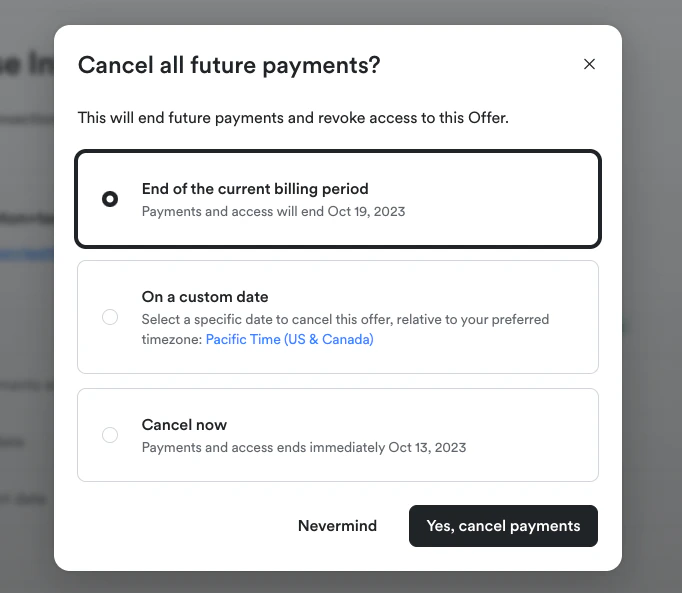
* **End of the current billing period**: If you cancel a subscription with time left in the billing period, your customers will have the Offer and Product access until the end of the billing period.
* **On a custom date**: Offer and Product access will remain active until the custom date you select.
* **Cancel now**: If you cancel a subscription immediately, payments will stop, and Offer and Product access will be revoked instantly.
 #### Canceling a subscription in PayPal
##### Customer initiated self-cancelations
For PayPal subscriptions to reflect cancelations in Kajabi, your customer must manually cancel their subscription in their PayPal account. After it has been canceled, PayPal will automatically notify you about the cancelation, and the Offer and associated Product access will be revoked on the last day of the customer's billing cycle.
##### Hero initiated self-cancelations
If you need to cancel a PayPal subscription, the Offer and Product access will be revoked on the last day of their billing cycle. [Learn how to cancel PayPal subscriptions](/articles/contacts/manage-your-contacts/how-to-cancel-your-customers-subscription#h_0aae4dd9-c6af-46ba-bc8e-c18172f287bf) for step-by-step instructions.
#### Canceling a subscription in PayPal
##### Customer initiated self-cancelations
For PayPal subscriptions to reflect cancelations in Kajabi, your customer must manually cancel their subscription in their PayPal account. After it has been canceled, PayPal will automatically notify you about the cancelation, and the Offer and associated Product access will be revoked on the last day of the customer's billing cycle.
##### Hero initiated self-cancelations
If you need to cancel a PayPal subscription, the Offer and Product access will be revoked on the last day of their billing cycle. [Learn how to cancel PayPal subscriptions](/articles/contacts/manage-your-contacts/how-to-cancel-your-customers-subscription#h_0aae4dd9-c6af-46ba-bc8e-c18172f287bf) for step-by-step instructions.