> ## Documentation Index
> Fetch the complete documentation index at: https://help.kajabi.com/llms.txt
> Use this file to discover all available pages before exploring further.
# Build navigation menus
> Create custom navigation menus, add links, and edit menu items for pages.
Custom navigation menus help guide your site visitors to explore different areas of your site. You can create multiple menus for different purposes and assign them to specific pages.
## Add a navigation menu
1. From your Dashboard, open the **Website** tab.
2. Click the **Navigation** tab.
3. Navigate to the top-right corner of the page and click **+ New Navigation Menu.**
4. Enter your navigation menu **Name** to easily identify when assigning the navigation menu on your site. Your navigation menu name is only visible internally and will not be displayed to your site visitors and customers.
5. Click **Save Menu** to create.
After creating your navigation menu, [follow these instructions to add your menu to a page](/articles/website/navigation/how-to-assign-your-navigation-menu).
**Tip:** Want to turn your menu into a dropdown navigation menu? [Learn how to add dropdown menus to your page headers](/articles/website/pages/add-a-dropdown-menu-to-your-header).
**Note:** Navigation items inherit their font size and color from your page's Style Guide settings. To change how navigation items look, update the **Fonts** and **Font Colors** settings in your Style Guide. [Learn how to customize your Style Guide](../../website/pages/customize-your-page-font-and-style-with-the-style-guide).
## Add links to existing navigation menus
Before adding a link to a navigation menu, copy the URL or take note of the name of your course product lesson, product module, or static page that you wish to add to your navigation menu.
### Add a link
1. Select the menu in which you would like to add a link, then click **Add.**
2. Select your desired link type:
* **Add Product** - Add a link to a **Module** or **Lesson**
* **Add Page** - Add a link to any of your [landing pages](/articles/website/pages/how-to-connect-your-landing-pages-to-your-website) on Kajabi
* **Add Link** - Add a link to a site outside of Kajabi
**Note:** Navigation link names have a maximum length of 50 characters. If you add a custom URL link, the URL must begin with `http://`, `https://`, or `/`.
## Edit navigation menus
You can edit your navigation menu link names, change the URLs, edit visibility settings, or delete links.
### Edit a navigation link
1. Click the **✐** icon on the link you would like to edit. You can change the **Title**, the **Path/URL**, the **Visibility Settings**, or **Delete the Link.**
### Rearrange links in a navigation menu
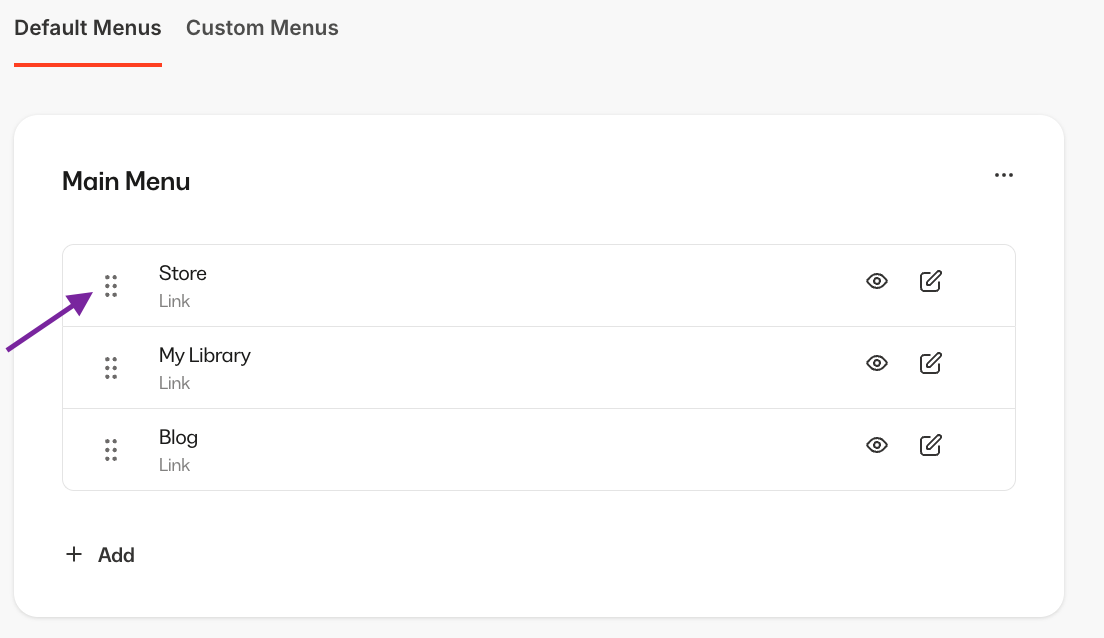
1. Hover over the dotted icon for the menu link you wish to move.
2. Click and drag the link to your desired location.