> ## Documentation Index
> Fetch the complete documentation index at: https://help.kajabi.com/llms.txt
> Use this file to discover all available pages before exploring further.
# Cookies and cookie disclaimers
> Learn about the cookies Kajabi uses on your site and how to add a cookie disclaimer.
Kajabi uses **cookies** to help your site run and to provide the best experience for your visitors and customers. This article provides an overview of the cookies Kajabi uses on your site to help you better understand those cookies, and to help you document your cookies for your visitors.
**Note:**
Keep in mind, this article does not cover the cookies Kajabi uses for the Kajabi website. For more information about the use of our cookies, including the cookies we use on kajabi.com, see our [Cookie Notice](https://kajabi.com/policies/cookie-notice) and [Privacy Policy](https://kajabi.com/policies/privacy).
***
## What are cookies?
**Cookies** are small pieces of data that store small pieces of information. Websites send cookies to a user's browser to track user behavior and enable user-specific features such as checkout page purchases and login sessions.
It's important to understand that cookies are a necessary part of website functionality, as well as a source of privacy concerns and potential security risks if used maliciously or represented incorrectly on your site.
Documenting and sharing the cookies used on your site with your site visitors is important for complying with various privacy rules and regulations, and for creating a transparent, trustworthy brand that your contacts and site visitors can feel confident about.
[Learn more about how Kajabi helps you with privacy regulations](../../marketing/email-campaigns/how-kajabi-helps-you-with-privacy-regulations).
***
## Add a cookie disclaimer
Various laws require website owners to inform their visitors of cookies placed on their site and to ask for visitors' consent to the use of the cookies. Adding an appropriate cookie disclaimer will help you comply with regulations.
Inform your visitors of the various cookies used on your site by installing and managing a third-party cookie disclaimer.
We suggest using free cookie managers like [Cookie Script](https://cookie-script.com/) or a paid cookie manager like [Osano](https://www.osano.com/) or [OneTrust](https://www.onetrust.com/) on your site.
**Note:**
If your [Landing Page A/B test](../../website/pages/landing-page-ab-testing-overview) metrics are lower than expected, ensure your cookie blocker platform is configured to allow the "rl\_anonymous\_id" cookie as a required cookie rather than categorizing it as a performance cookie.
***
## Add a cookie consent banner script
For the purpose of this article, we added the Standard Cookie Script from [Cookie Script](https://cookie-script.com/) onto our example site.
### After finding your desired Script, add your Script to your site
1. Copy the generated script.
2. Then, log into your Kajabi account.
3. Open the **Settings** tab from your Dashboard.
4. Click **Site Details**.
5. Scroll down to the **Page Scripts** section.
6. In the text box, paste your generated script.
7. Click **Save**
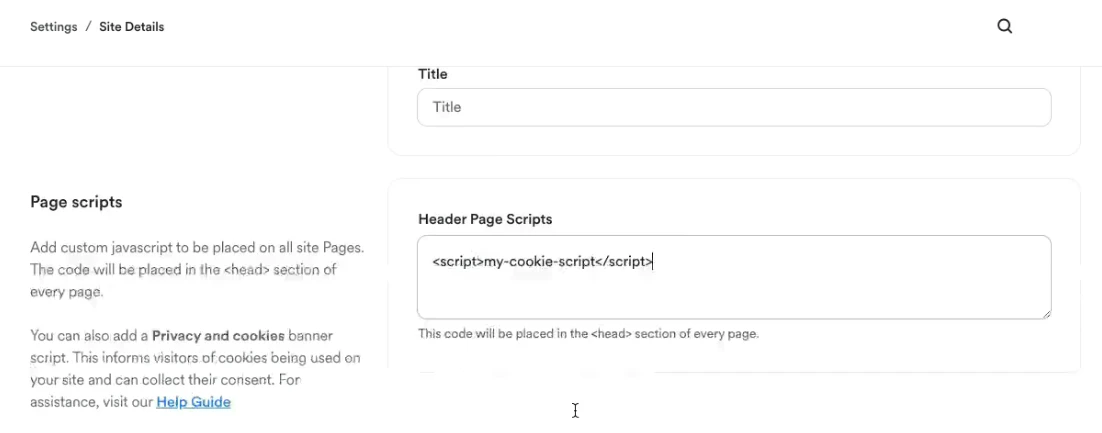 Adding your cookie script to Page scripts will install your cookie disclaimer on every page of your site, which allows page visitors to accept or block the cookies your website uses.
**Note:**
Page scripts are not included on Offer checkout pages or upsell pages. If you need cookie consent banners on those pages, add the script separately using the checkout page tracking code settings.
Preview your site to view your newly installed cookie disclaimer.
Adding your cookie script to Page scripts will install your cookie disclaimer on every page of your site, which allows page visitors to accept or block the cookies your website uses.
**Note:**
Page scripts are not included on Offer checkout pages or upsell pages. If you need cookie consent banners on those pages, add the script separately using the checkout page tracking code settings.
Preview your site to view your newly installed cookie disclaimer.
 ***
### Kajabi Meta Pixel integration
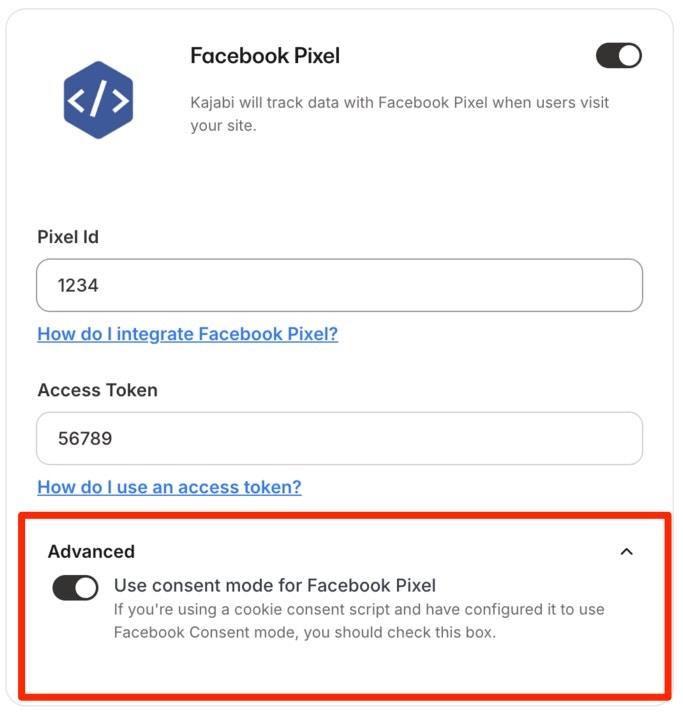
If you are also using the [**Kajabi Meta Pixel**](../../api-integrations/analytics-integrations/meta-pixel-with-kajabi) integration, you must configure it to use both [Cookie Scripts consent mode](https://help.cookie-script.com/en/banner-settings/enable-facebook-pixel-consent), and Facebook Consent mode:
***
### Kajabi Meta Pixel integration
If you are also using the [**Kajabi Meta Pixel**](../../api-integrations/analytics-integrations/meta-pixel-with-kajabi) integration, you must configure it to use both [Cookie Scripts consent mode](https://help.cookie-script.com/en/banner-settings/enable-facebook-pixel-consent), and Facebook Consent mode:
 **Tip:**
If you have access to the Code Editor available with the Pro Plan, paste your preferred Cookie Script to specific Pages of your site! Learn more about our different pricing plans at [kajabi.com/pricing](https://kajabi.com/pricing).
**Tip:**
If you have access to the Code Editor available with the Pro Plan, paste your preferred Cookie Script to specific Pages of your site! Learn more about our different pricing plans at [kajabi.com/pricing](https://kajabi.com/pricing).