> ## Documentation Index
> Fetch the complete documentation index at: https://help.kajabi.com/llms.txt
> Use this file to discover all available pages before exploring further.
# Add a hero section
> Learn to add a Hero Section to your pages.
**Note:** This guide refers to the latest page editor available with the Website Builder and Kajabi Pages. If you are using the Premier Legacy Templates, please refer to the guide [here](/articles/website/pages/how-to-add-a-hero-section-in-your-page-with-premier).
***
## What is a hero section?
The Hero Section is a Background with a Content Overlay.
Although simple, understanding the concept of the Hero Section is powerful because it gives you the flexibility to build and create beautifully designed pages by simply adding a background to your Sections.
Kajabi helps streamline the process of building your pages by providing Hero Section presets. Building pages in Kajabi gives you the freedom to create any Section as a Hero Section by simply customizing your [Background in the Section Settings](/articles/website/pages/how-to-customize-your-section-background-settings) of any Section on your page.
**Although flexible, it is important to note the unique build of the Hero Section Presets.**
Adding Blocks and customizing the Background of your Sections can create similar Sections to the Hero Section Presets but you may notice that the appearance will differ slightly when adding Block Types to a Section.
### Adding a hero section
* Open the **Website** tab from the Dashboard
* Select the **Pages** tab
* Open the page editor for your Page. [Learn more](/articles/website/pages/how-to-get-to-the-page-editor)
* Navigate to the sidebar panel
* Click **Add Section**
* Select your Section from **Hero**:
**Tip:** A Hero section with a Countdown, Form, Image, or Video can be removed or added when editing. Because a Section is made up of blocks, simply Add Content to add an additional Block Type to your Hero section. Keep in mind, the appearance may differ slightly when adding Block Types to a Section compared to adding a Section Preset.
***
## Preset hero sections
Learn about each Hero Section:
* Hero
* Hero Countdown
* Hero with Form
* Hero with Image
* Hero with Audio
* Hero with Video
### Hero
Adding a Hero Section to your page will generate a Text Block with the Call to Action Block Setting enabled. This may be familiar to you if you have added a [Call to Action Section](/articles/website/pages/add-a-basic-content-section-to-your-page#call-to-action) to your page.
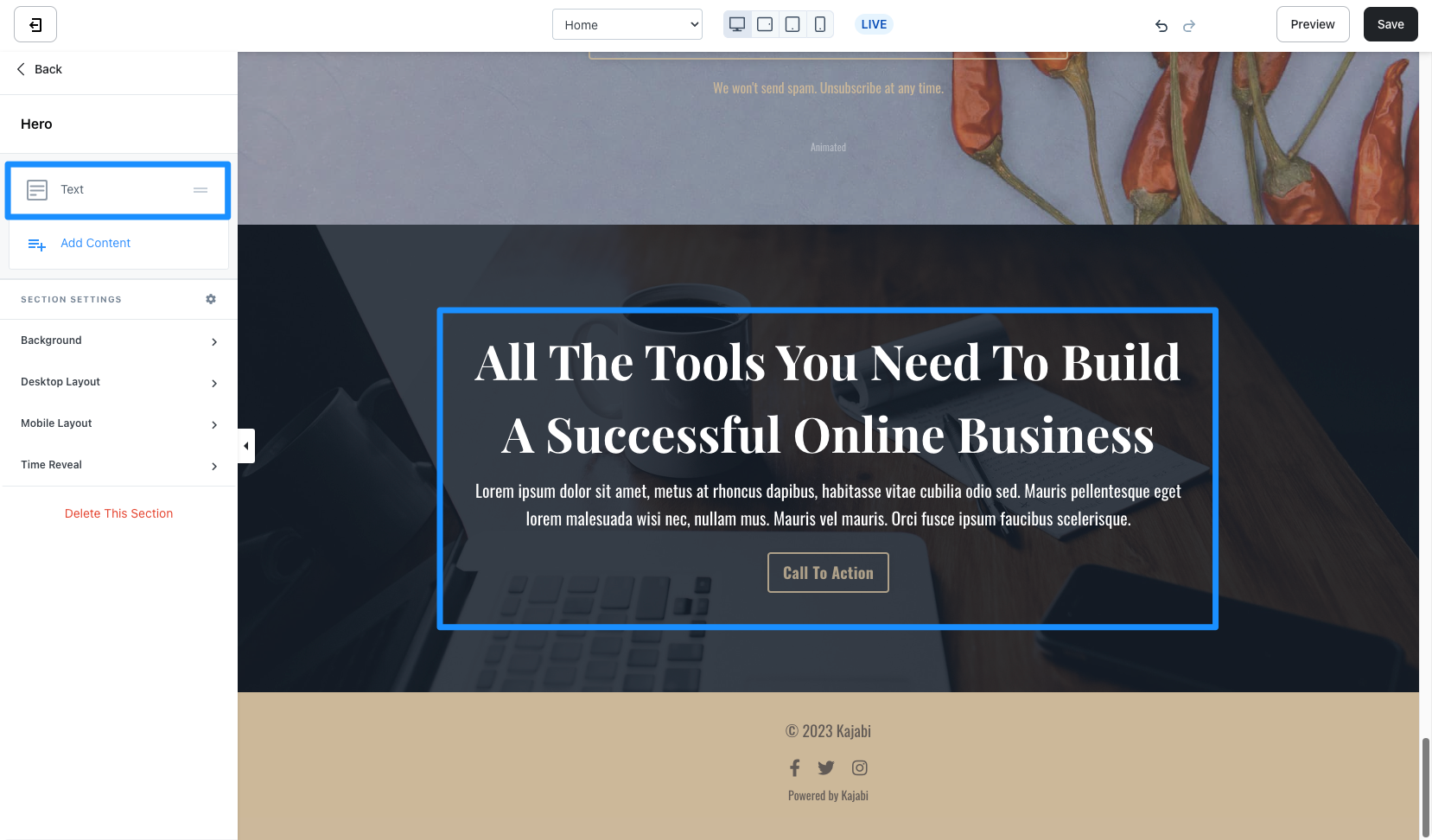 Customize your Hero Section by editing the [Text Block](/articles/website/pages/how-to-add-a-text-block-to-your-page#customizing-your-text-block) and Section Settings to change the appearance, behavior, and content.
**Section Settings:**
* [Background](/articles/website/pages/how-to-customize-your-section-background-settings)
* [Section Layout](/articles/website/pages/customizing-section-layout-settings)
* [Time Reveal](/articles/website/pages/customizing-time-reveal-settings)
### Hero countdown
The Hero Countdown Section generates a single Text Block and a Countdown Block. However, you will notice that a Hero Countdown Section will differ in appearance compared to adding a [Countdown Block](/articles/website/pages/how-to-add-a-countdown-block-to-your-page) to a Section:
Customize your Hero Section by editing the [Text Block](/articles/website/pages/how-to-add-a-text-block-to-your-page#customizing-your-text-block) and Section Settings to change the appearance, behavior, and content.
**Section Settings:**
* [Background](/articles/website/pages/how-to-customize-your-section-background-settings)
* [Section Layout](/articles/website/pages/customizing-section-layout-settings)
* [Time Reveal](/articles/website/pages/customizing-time-reveal-settings)
### Hero countdown
The Hero Countdown Section generates a single Text Block and a Countdown Block. However, you will notice that a Hero Countdown Section will differ in appearance compared to adding a [Countdown Block](/articles/website/pages/how-to-add-a-countdown-block-to-your-page) to a Section:
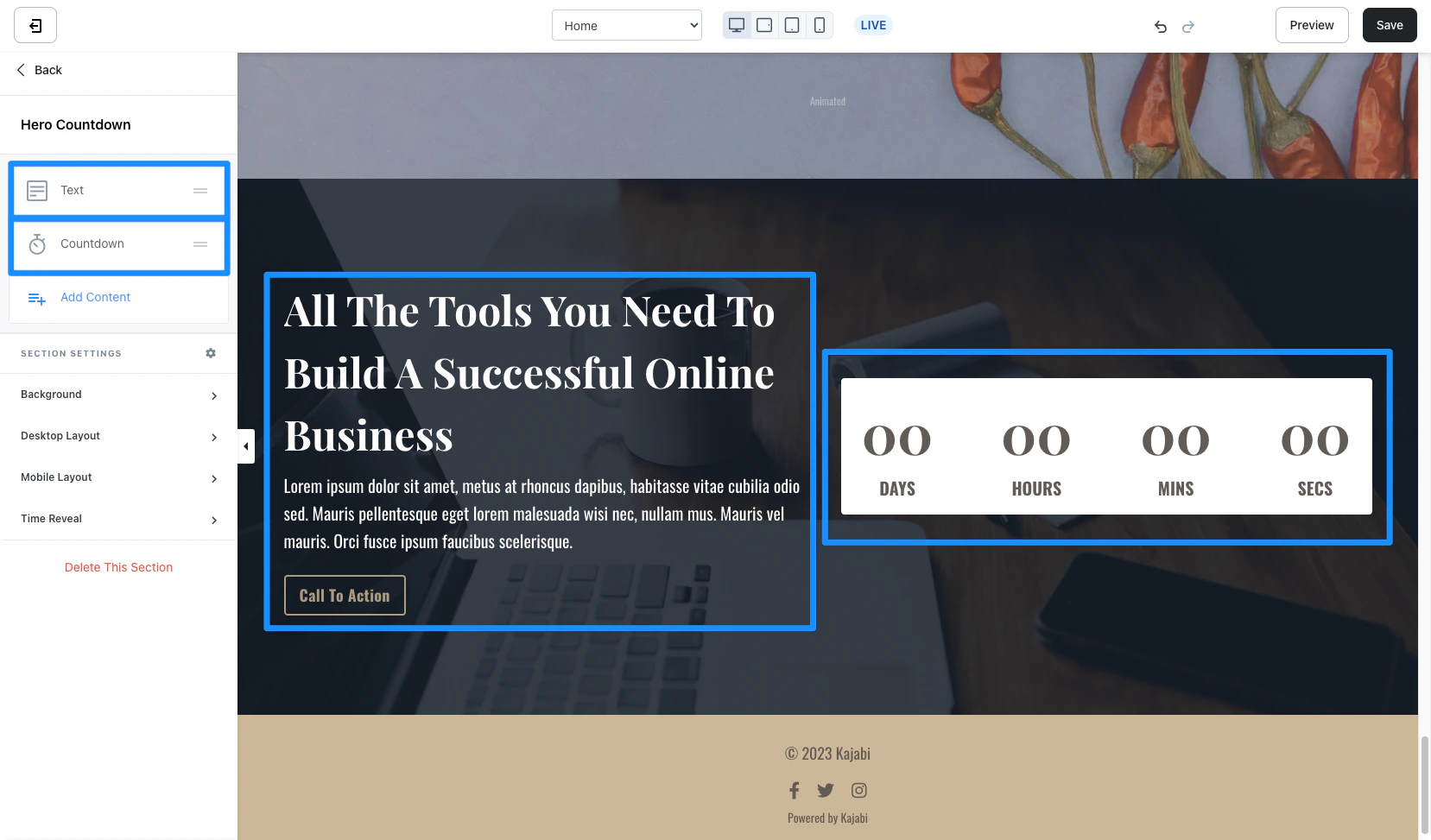 Customize your Hero Section by editing the [Text Block](/articles/website/pages/how-to-add-a-text-block-to-your-page#customizing-your-text-block), [Countdown Block](/articles/website/pages/how-to-add-a-countdown-block-to-your-page), and Section Settings to change the appearance, behavior, and content.
**Section Settings:**
* [Background](/articles/website/pages/how-to-customize-your-section-background-settings)
* [Section Layout](/articles/website/pages/customizing-section-layout-settings)
* [Time Reveal](/articles/website/pages/customizing-time-reveal-settings)
### Hero with form
The Hero with Form Section generates a single Text Block and a Form Block. However, you will notice that creating a Hero with Form Section will differ slightly in appearance compared to adding a [Form Block](/articles/website/pages/how-to-add-a-form-to-your-page) to a Section.
Adding the Hero with Form Section includes a default Disclaimer Text to the Form Block:
Customize your Hero Section by editing the [Text Block](/articles/website/pages/how-to-add-a-text-block-to-your-page#customizing-your-text-block), [Countdown Block](/articles/website/pages/how-to-add-a-countdown-block-to-your-page), and Section Settings to change the appearance, behavior, and content.
**Section Settings:**
* [Background](/articles/website/pages/how-to-customize-your-section-background-settings)
* [Section Layout](/articles/website/pages/customizing-section-layout-settings)
* [Time Reveal](/articles/website/pages/customizing-time-reveal-settings)
### Hero with form
The Hero with Form Section generates a single Text Block and a Form Block. However, you will notice that creating a Hero with Form Section will differ slightly in appearance compared to adding a [Form Block](/articles/website/pages/how-to-add-a-form-to-your-page) to a Section.
Adding the Hero with Form Section includes a default Disclaimer Text to the Form Block:
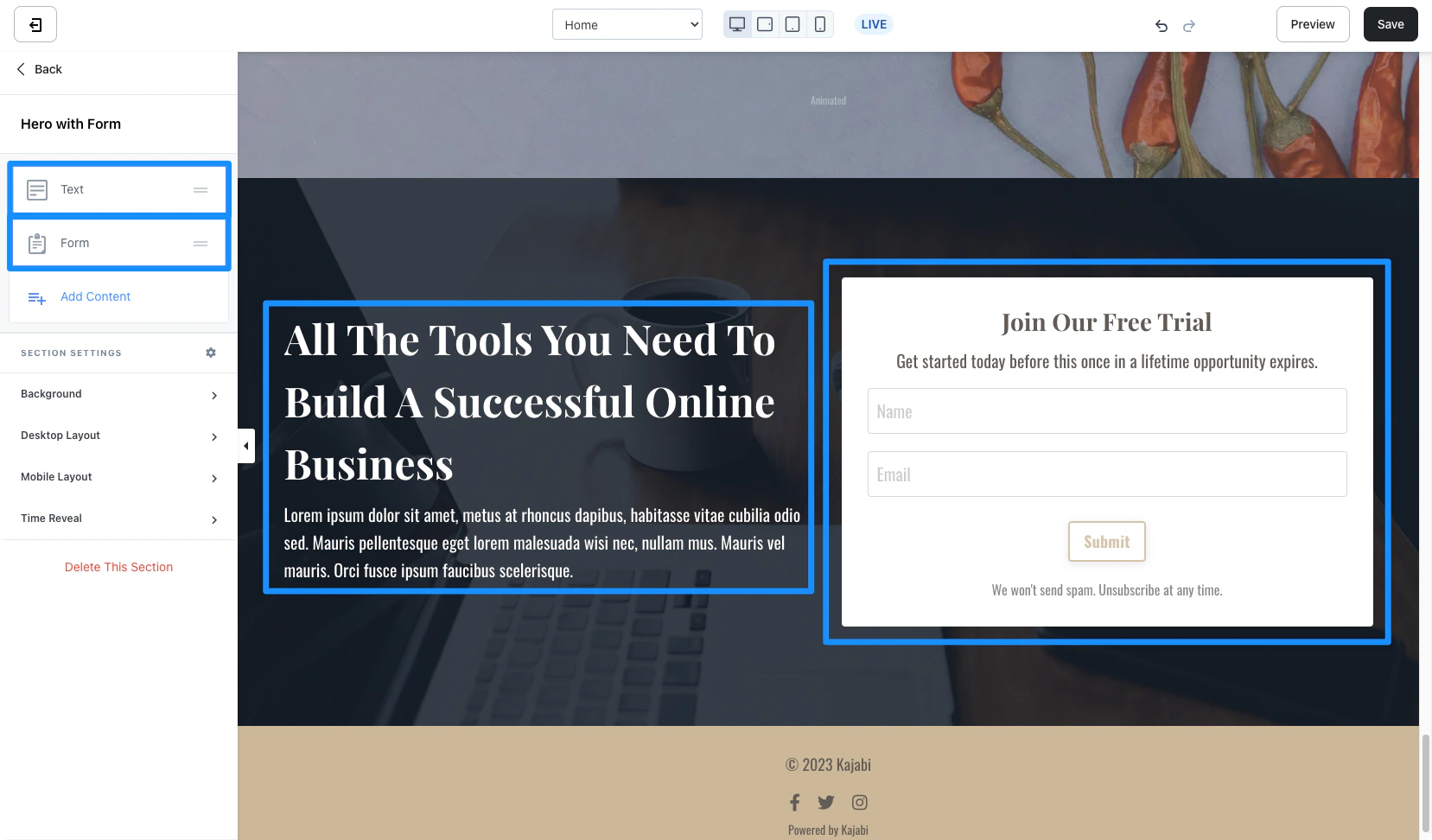 Customize your Hero with Form Section by editing the [Text Block](/articles/website/pages/how-to-add-a-text-block-to-your-page#customizing-your-text-block), [Form Block](/articles/website/pages/how-to-add-a-form-to-your-page), and Section Settings to change the appearance, behavior, and content.
**Section Settings:**
* [Background](/articles/website/pages/how-to-customize-your-section-background-settings)
* [Section Layout](/articles/website/pages/customizing-section-layout-settings)
* [Time Reveal](/articles/website/pages/customizing-time-reveal-settings)
### Hero with image
The Hero with Form Section generates a single Text Block with the Call to Action Block Settings enabled and an Image Block:
Customize your Hero with Form Section by editing the [Text Block](/articles/website/pages/how-to-add-a-text-block-to-your-page#customizing-your-text-block), [Form Block](/articles/website/pages/how-to-add-a-form-to-your-page), and Section Settings to change the appearance, behavior, and content.
**Section Settings:**
* [Background](/articles/website/pages/how-to-customize-your-section-background-settings)
* [Section Layout](/articles/website/pages/customizing-section-layout-settings)
* [Time Reveal](/articles/website/pages/customizing-time-reveal-settings)
### Hero with image
The Hero with Form Section generates a single Text Block with the Call to Action Block Settings enabled and an Image Block:
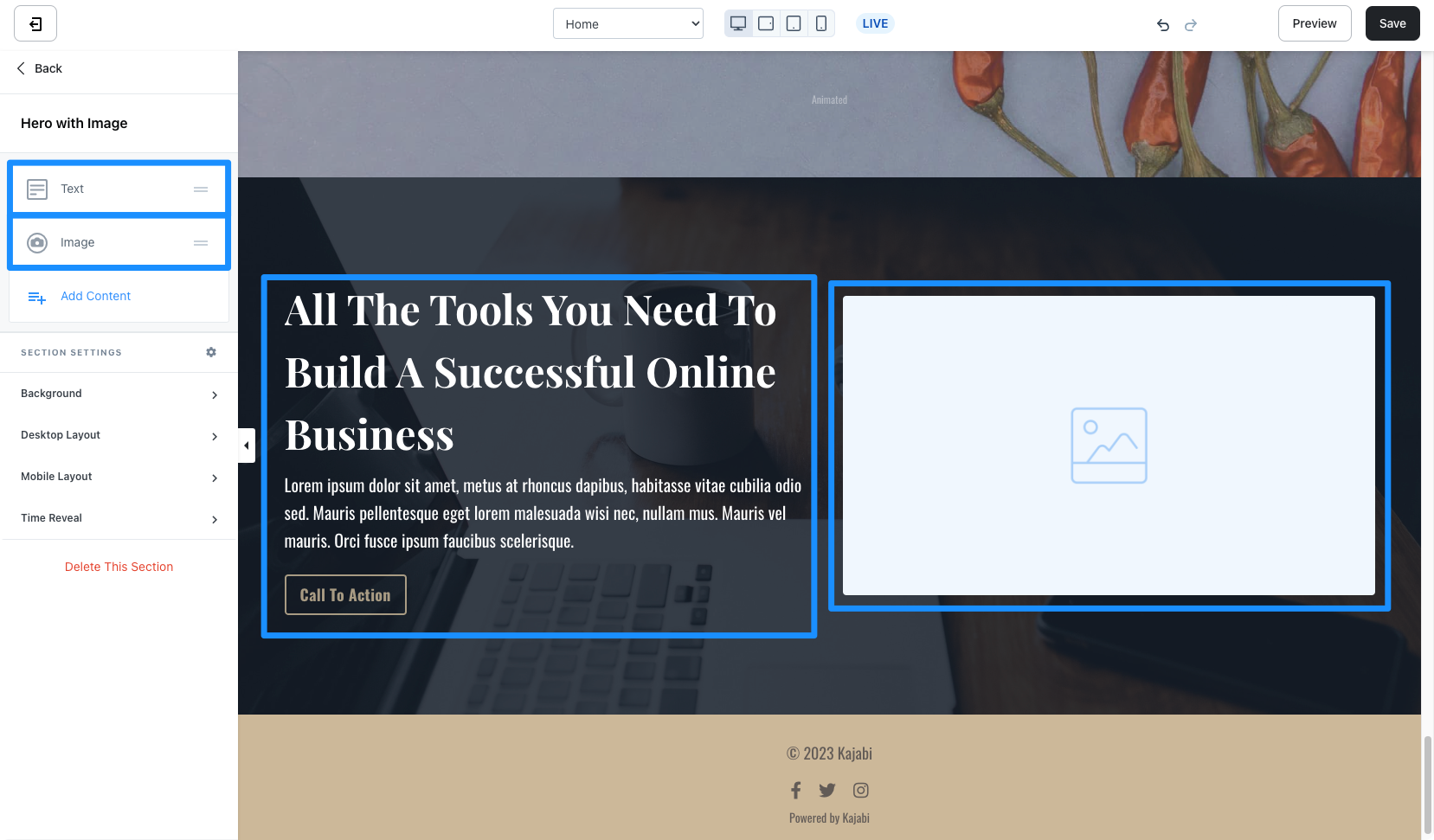 Customize your Hero with Image Section by editing the [Text Block](/articles/website/pages/how-to-add-a-text-block-to-your-page#customizing-your-text-block), [Image Block](/articles/website/pages/how-to-add-an-image-to-your-page), and Section Settings to change the appearance, behavior, and content.
[Learn to customize your images with Adobe Express.](/articles/website/pages/how-to-customize-your-images-on-kajabi-with-adobe-express)
**Section Settings:**
* [Background](/articles/website/pages/how-to-customize-your-section-background-settings)
* [Section Layout](/articles/website/pages/customizing-section-layout-settings)
* [Time Reveal](/articles/website/pages/customizing-time-reveal-settings)
### Hero with audio
The Hero with Form Section generates a single Text Block with the Call to Action Block Settings enabled and an Audio Block:
Customize your Hero with Image Section by editing the [Text Block](/articles/website/pages/how-to-add-a-text-block-to-your-page#customizing-your-text-block), [Image Block](/articles/website/pages/how-to-add-an-image-to-your-page), and Section Settings to change the appearance, behavior, and content.
[Learn to customize your images with Adobe Express.](/articles/website/pages/how-to-customize-your-images-on-kajabi-with-adobe-express)
**Section Settings:**
* [Background](/articles/website/pages/how-to-customize-your-section-background-settings)
* [Section Layout](/articles/website/pages/customizing-section-layout-settings)
* [Time Reveal](/articles/website/pages/customizing-time-reveal-settings)
### Hero with audio
The Hero with Form Section generates a single Text Block with the Call to Action Block Settings enabled and an Audio Block:
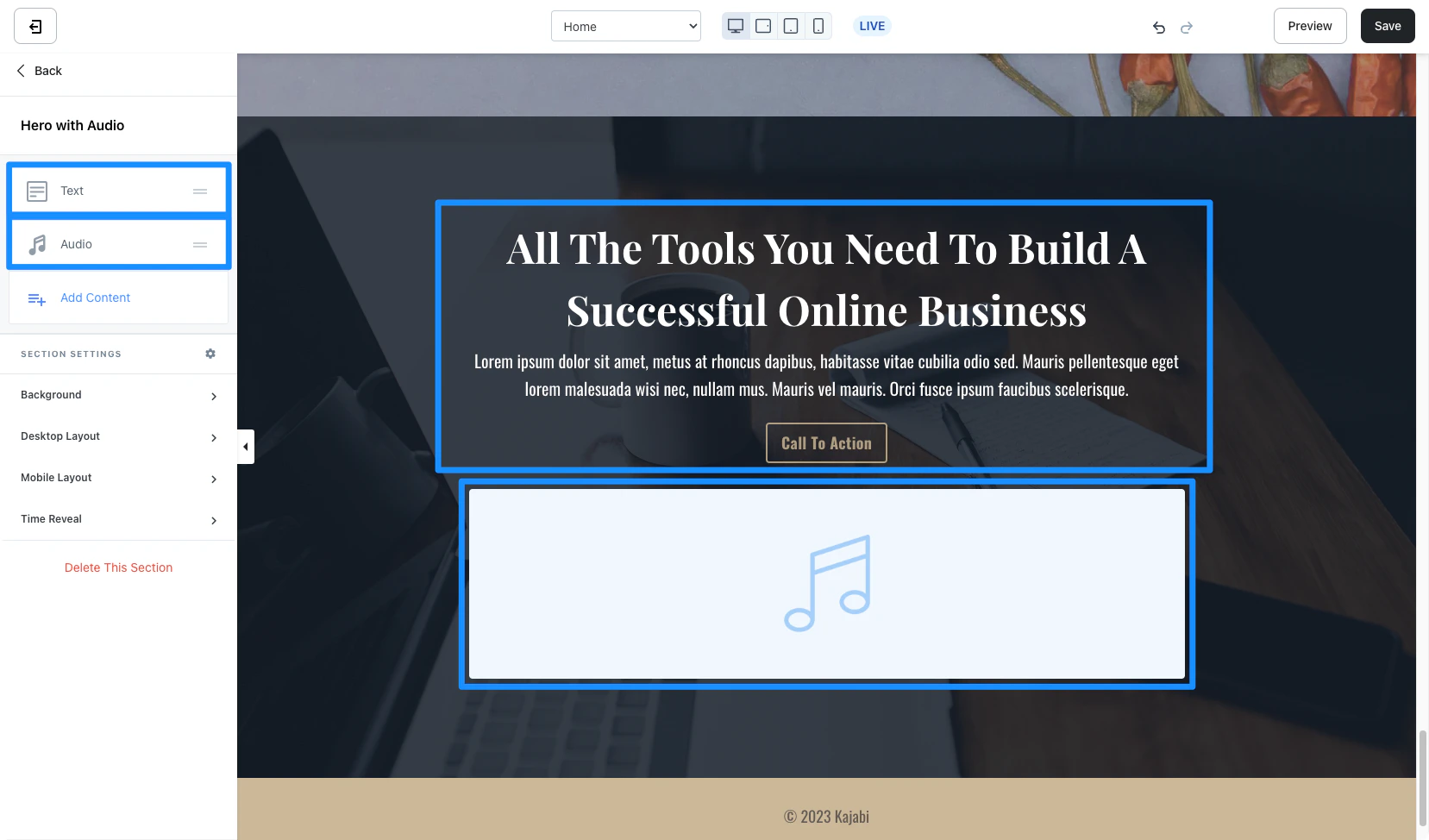 Customize your Hero with Audio Section by editing the [Text Block](/articles/website/pages/how-to-add-a-text-block-to-your-page#customizing-your-text-block), [Video Block](/articles/website/pages/how-to-add-a-video-block-to-your-pages), and Section Settings to change the appearance, behavior, and content.
**Section Settings:**
* [Background](/articles/website/pages/how-to-customize-your-section-background-settings)
* [Section Layout](/articles/website/pages/customizing-section-layout-settings)
* [Time Reveal](/articles/website/pages/customizing-time-reveal-settings)
### Hero with video
The Hero with Form Section generates a single Text Block with the Call to Action Block Settings enabled and a Video Block:
Customize your Hero with Audio Section by editing the [Text Block](/articles/website/pages/how-to-add-a-text-block-to-your-page#customizing-your-text-block), [Video Block](/articles/website/pages/how-to-add-a-video-block-to-your-pages), and Section Settings to change the appearance, behavior, and content.
**Section Settings:**
* [Background](/articles/website/pages/how-to-customize-your-section-background-settings)
* [Section Layout](/articles/website/pages/customizing-section-layout-settings)
* [Time Reveal](/articles/website/pages/customizing-time-reveal-settings)
### Hero with video
The Hero with Form Section generates a single Text Block with the Call to Action Block Settings enabled and a Video Block:
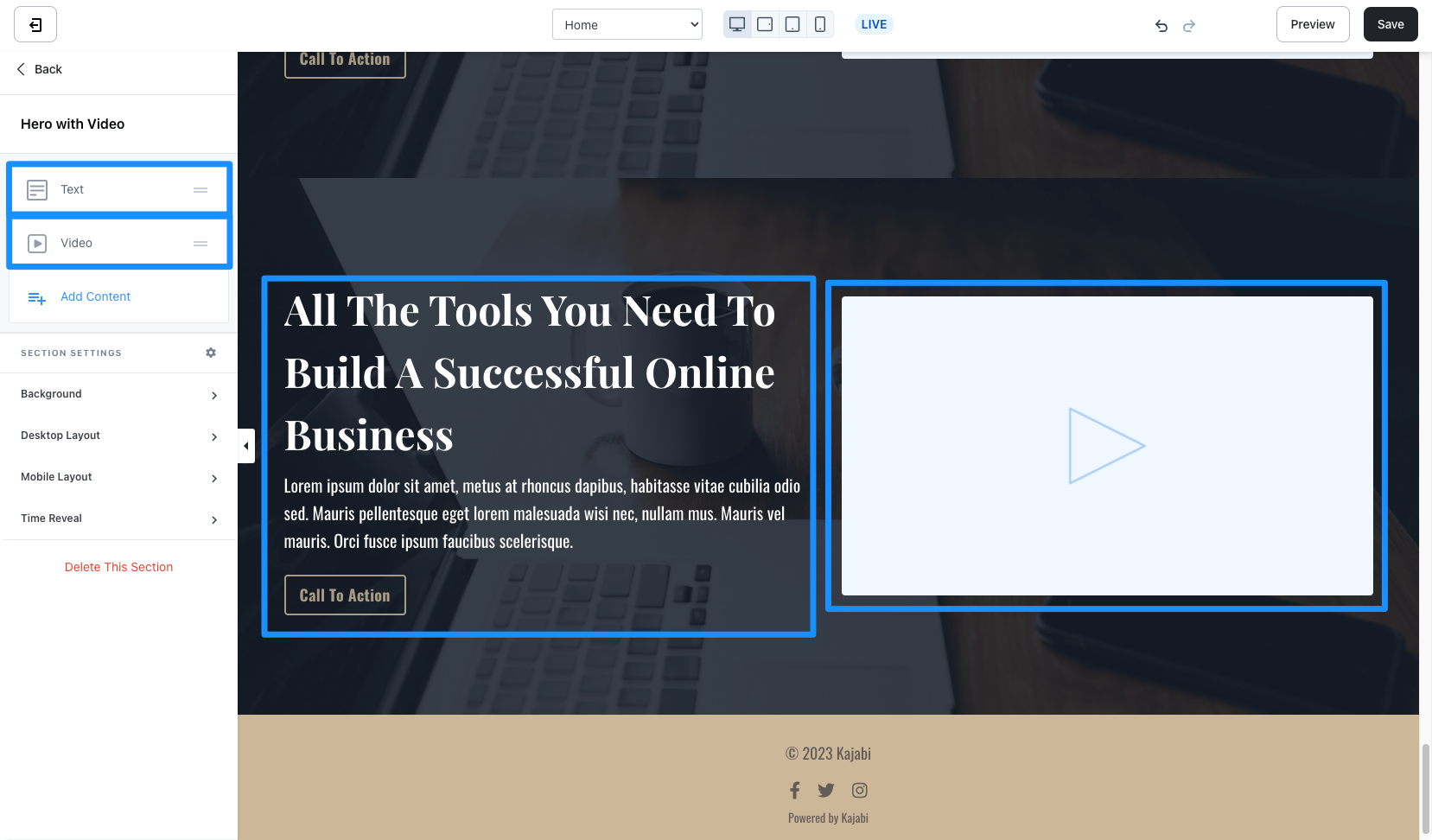 Customize your Hero with Form Section by editing the [Text Block](/articles/website/pages/how-to-add-a-text-block-to-your-page#customizing-your-text-block), [Video Block](/articles/website/pages/how-to-add-a-video-block-to-your-pages), and Section Settings to change the appearance, behavior, and content.
**Section Settings:**
* [Background](/articles/website/pages/how-to-customize-your-section-background-settings)
* [Section Layout](/articles/website/pages/customizing-section-layout-settings)
* [Time Reveal](/articles/website/pages/customizing-time-reveal-settings)
Customize your Hero with Form Section by editing the [Text Block](/articles/website/pages/how-to-add-a-text-block-to-your-page#customizing-your-text-block), [Video Block](/articles/website/pages/how-to-add-a-video-block-to-your-pages), and Section Settings to change the appearance, behavior, and content.
**Section Settings:**
* [Background](/articles/website/pages/how-to-customize-your-section-background-settings)
* [Section Layout](/articles/website/pages/customizing-section-layout-settings)
* [Time Reveal](/articles/website/pages/customizing-time-reveal-settings)