> ## Documentation Index
> Fetch the complete documentation index at: https://help.kajabi.com/llms.txt
> Use this file to discover all available pages before exploring further.
# Change the link of a header logo
> With the Code Editor available with Access or the Pro Plan, learn to change the link of your Header Logo.
With the Code Editor available with [Access](https://help.kajabi.com/hc/en-us/articles/360058304873) or the Pro Plan, learn to change the link of your Header Logo.
**Note:** Changing the link of your Header Logo requires the Code Editor only available with the Pro Plan or [Access](https://help.kajabi.com/hc/en-us/articles/360058304873). Check out [kajabi.com/pricing](https://kajabi.com/pricing) for details on the Pro Plan.
***
## What is the header logo?
The Header Logo is located at the top of your page to display your brand and identify your site. In addition to branding your page, the Header Logo behaves as a clickable link to lead your page visitors back to the homepage of your site:
 Natively, the Header Logo is linked to the homepage of your site (i.e., [Template Home](/articles/website/pages/what-is-the-template-home) or [Custom Homepage](/articles/website/pages/change-your-homepage)).
However, if you wish to link to a different page when a visitor clicks your Header Logo, use the Code Editor available with the Pro Plan to change the link.
Looking to completely remove your Header Logo? Learn to customize your Header Logo in pages built with [Premier](/articles/website/pages/how-to-customize-your-header-in-your-page-with-premier) or [Kajabi Pages](/articles/website/pages/customizing-your-header).
***
## Changing the link with the website builder
First, copy the link you want your Header Logo to lead to.
Then, use the [Code Editor](/articles/website/pages/how-to-access-the-code-editor) to change your logo link:
* Open the **Code Editor** for your desired website page.
* Open the **Snippets** folder.
* Click open the `shared_block_logo.liquid` file.
* Locate `` near or on line 14.
In this code snippet, replace the forward slash (/) with your full URL (e.g., [https://help.kajabi.com](https://help.kajabi.com)):
Natively, the Header Logo is linked to the homepage of your site (i.e., [Template Home](/articles/website/pages/what-is-the-template-home) or [Custom Homepage](/articles/website/pages/change-your-homepage)).
However, if you wish to link to a different page when a visitor clicks your Header Logo, use the Code Editor available with the Pro Plan to change the link.
Looking to completely remove your Header Logo? Learn to customize your Header Logo in pages built with [Premier](/articles/website/pages/how-to-customize-your-header-in-your-page-with-premier) or [Kajabi Pages](/articles/website/pages/customizing-your-header).
***
## Changing the link with the website builder
First, copy the link you want your Header Logo to lead to.
Then, use the [Code Editor](/articles/website/pages/how-to-access-the-code-editor) to change your logo link:
* Open the **Code Editor** for your desired website page.
* Open the **Snippets** folder.
* Click open the `shared_block_logo.liquid` file.
* Locate `` near or on line 14.
In this code snippet, replace the forward slash (/) with your full URL (e.g., [https://help.kajabi.com](https://help.kajabi.com)):
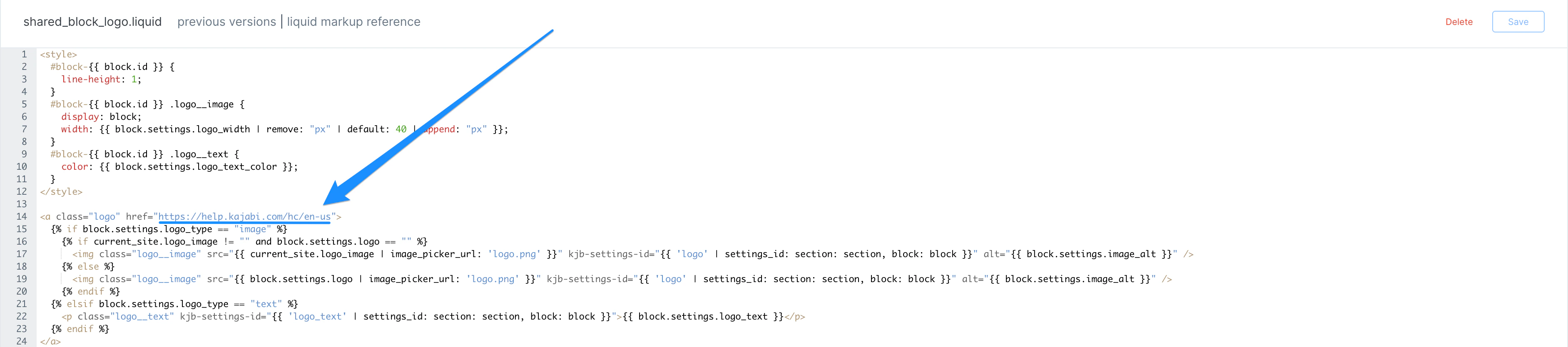 After updating your Header Logo with your desired link:
* Click **Save** to keep your changes.
After the Save button has transitioned from blue to white:
* Click **Preview** to test your new Header Logo link.
***
## Changing the link with Kajabi Pages
**Note:** Changing the Header Logo link will also change the link in the [Page Footer](/articles/website/pages/customizing-your-footer) for your pages.
First, copy the link you want your Header Logo to lead to.
Then, use the [Code Editor](how-to-access-the-code-editor#page-theme) to change your logo link for a page:
* Open the **Code Editor** for your desired page.
* Open the **Snippets** folder.
* Click open the `shared_block_logo.liquid` file.
* Locate `` near or on line 14.
In this code snippet, replace the forward slash (/) with your full URL (e.g., [https://help.kajabi.com](https://help.kajabi.com)):
After updating your Header Logo with your desired link:
* Click **Save** to keep your changes.
After the Save button has transitioned from blue to white:
* Click **Preview** to test your new Header Logo link.
***
## Changing the link with Kajabi Pages
**Note:** Changing the Header Logo link will also change the link in the [Page Footer](/articles/website/pages/customizing-your-footer) for your pages.
First, copy the link you want your Header Logo to lead to.
Then, use the [Code Editor](how-to-access-the-code-editor#page-theme) to change your logo link for a page:
* Open the **Code Editor** for your desired page.
* Open the **Snippets** folder.
* Click open the `shared_block_logo.liquid` file.
* Locate `` near or on line 14.
In this code snippet, replace the forward slash (/) with your full URL (e.g., [https://help.kajabi.com](https://help.kajabi.com)):
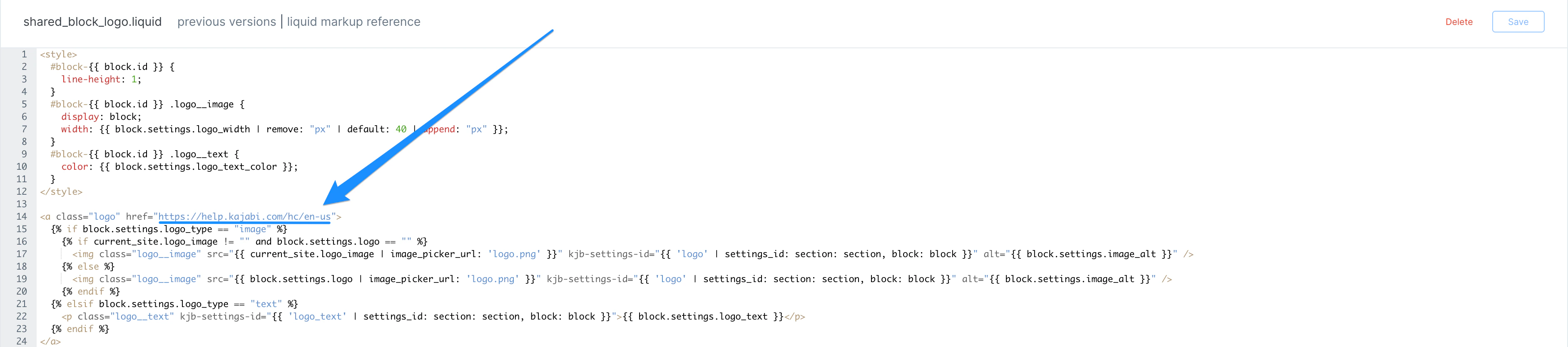 After updating your Header Logo with your desired link:
* Click **Save** to keep your changes.
After the Save button has transitioned from blue to white:
* Click **Preview** to test your new Header Logo link.
***
## Changing the link with Premier
First, copy the link you want your Header Logo to lead to.
Then, use the [Code Editor](/articles/website/pages/how-to-access-the-code-editor) to change your logo link for a page built with Premier:
* Open the **Code Editor** for your desired landing page built with Premier.
* Open the **Sections** folder.
* Click open the `header.liquid` file.
* Locate `` near or on line 9.
* Similarly, locate `` near or on line 14.
For both snippets of code, replace the forward slash (/) with your full URL (e.g., [https://kajabi.com](https://kajabi.com)):
After updating your Header Logo with your desired link:
* Click **Save** to keep your changes.
After the Save button has transitioned from blue to white:
* Click **Preview** to test your new Header Logo link.
***
## Changing the link with Premier
First, copy the link you want your Header Logo to lead to.
Then, use the [Code Editor](/articles/website/pages/how-to-access-the-code-editor) to change your logo link for a page built with Premier:
* Open the **Code Editor** for your desired landing page built with Premier.
* Open the **Sections** folder.
* Click open the `header.liquid` file.
* Locate `` near or on line 9.
* Similarly, locate `` near or on line 14.
For both snippets of code, replace the forward slash (/) with your full URL (e.g., [https://kajabi.com](https://kajabi.com)):
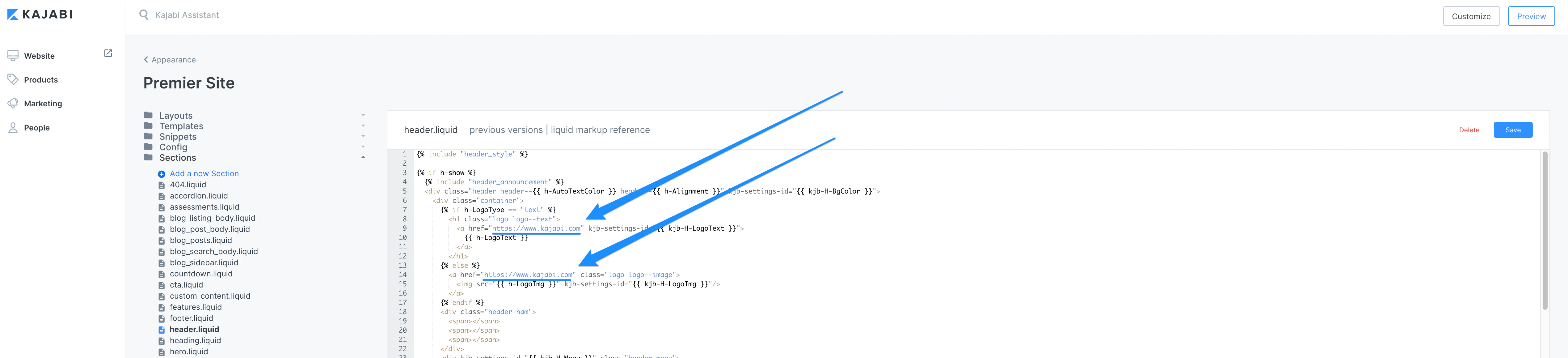 After updating your Header Logo with your desired link:
* Click **Save** to keep your changes.
After the Save button has transitioned from blue to white:
* Click **Preview** to test your new Header Logo link.
After updating your Header Logo with your desired link:
* Click **Save** to keep your changes.
After the Save button has transitioned from blue to white:
* Click **Preview** to test your new Header Logo link.