> ## Documentation Index
> Fetch the complete documentation index at: https://help.kajabi.com/llms.txt
> Use this file to discover all available pages before exploring further.
# Troubleshoot Kajabi if pages don't load properly
> Follow troubleshooting steps to fix pages that aren't loading properly on your desktop or laptop devices.
If your pages on Kajabi aren't loading properly on your desktop or laptop devices, follow the troubleshooting steps listed in this guide.
***
## Why does this happen?
If your pages look similar to the image below with inconsistent formatting, you may have a web protection or antivirus software blocking your web content, a browser issue, or a problem with your internet connection.
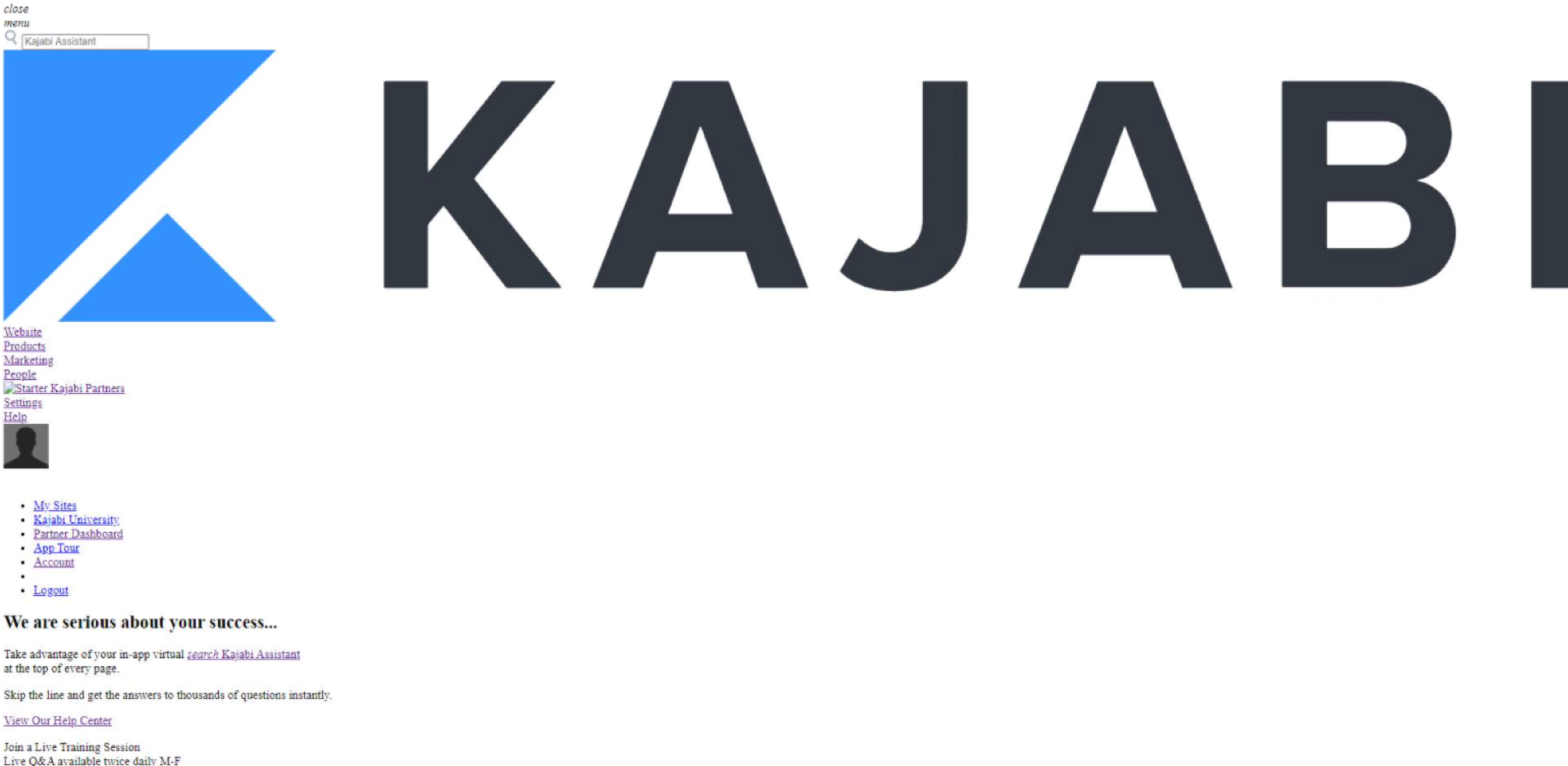 Follow this guide to troubleshoot Kajabi if your pages are not loading properly.
If you are using a different web browser or antivirus software, check its support site for specific instructions.
**Note:** Are you experiencing a 404 error or seeing the login page when editing your site? [Learn how to remedy this issue here.](../../website/pages/why-does-the-login-page-or-404-error-keep-appearing-when-editing-my-site)
***
## Step 1. Clear your browser cache
Your page may not load properly if your browser is blocking your web content.
Have you attempted to log in with a different browser? If not, try accessing your Kajabi account with a different web browser (e.g., Safari, Google Chrome, Firefox, etc.).
If your page loads normally with a different web browser, try clearing your browser cache.
Here are a few commonly used browsers and their support guides for how to clear the browser cache:
* **Using Google Chrome?** Read [Google's Support Guide](https://support.google.com/accounts/answer/32050?hl=en) on Clearing Cache and Cookies.
* **Using Safari?** Read [Apple's Support Guide](https://support.apple.com/guide/safari/manage-cookies-and-website-data-sfri11471/mac) on Removing Stored Cookies and Data.
* **Using Firefox?** Read [Mozilla's Support Guide](https://support.mozilla.org/en-US/kb/delete-browsing-search-download-history-firefox) to delete browsing, search, and download history.
***
## Step 2. Inspect your page
If you continue to have trouble logging into your account after attempting the previous steps you may be experiencing an issue with your web protection or antivirus software.
Use the Inspect tool to view the error in your browser's error console to find out if your antivirus software may be blocking your content from loading.
### Chrome
If you are using the Chrome web browser when the page fails to load:
* Hover over the page that fails to load properly and right-click anywhere on that page.
* Select **Inspect**.
* Open the **Console** tab.
* Scroll through the page and locate any red errors with the descriptor "blocked by network" or similar language like "network access denied":
Follow this guide to troubleshoot Kajabi if your pages are not loading properly.
If you are using a different web browser or antivirus software, check its support site for specific instructions.
**Note:** Are you experiencing a 404 error or seeing the login page when editing your site? [Learn how to remedy this issue here.](../../website/pages/why-does-the-login-page-or-404-error-keep-appearing-when-editing-my-site)
***
## Step 1. Clear your browser cache
Your page may not load properly if your browser is blocking your web content.
Have you attempted to log in with a different browser? If not, try accessing your Kajabi account with a different web browser (e.g., Safari, Google Chrome, Firefox, etc.).
If your page loads normally with a different web browser, try clearing your browser cache.
Here are a few commonly used browsers and their support guides for how to clear the browser cache:
* **Using Google Chrome?** Read [Google's Support Guide](https://support.google.com/accounts/answer/32050?hl=en) on Clearing Cache and Cookies.
* **Using Safari?** Read [Apple's Support Guide](https://support.apple.com/guide/safari/manage-cookies-and-website-data-sfri11471/mac) on Removing Stored Cookies and Data.
* **Using Firefox?** Read [Mozilla's Support Guide](https://support.mozilla.org/en-US/kb/delete-browsing-search-download-history-firefox) to delete browsing, search, and download history.
***
## Step 2. Inspect your page
If you continue to have trouble logging into your account after attempting the previous steps you may be experiencing an issue with your web protection or antivirus software.
Use the Inspect tool to view the error in your browser's error console to find out if your antivirus software may be blocking your content from loading.
### Chrome
If you are using the Chrome web browser when the page fails to load:
* Hover over the page that fails to load properly and right-click anywhere on that page.
* Select **Inspect**.
* Open the **Console** tab.
* Scroll through the page and locate any red errors with the descriptor "blocked by network" or similar language like "network access denied":
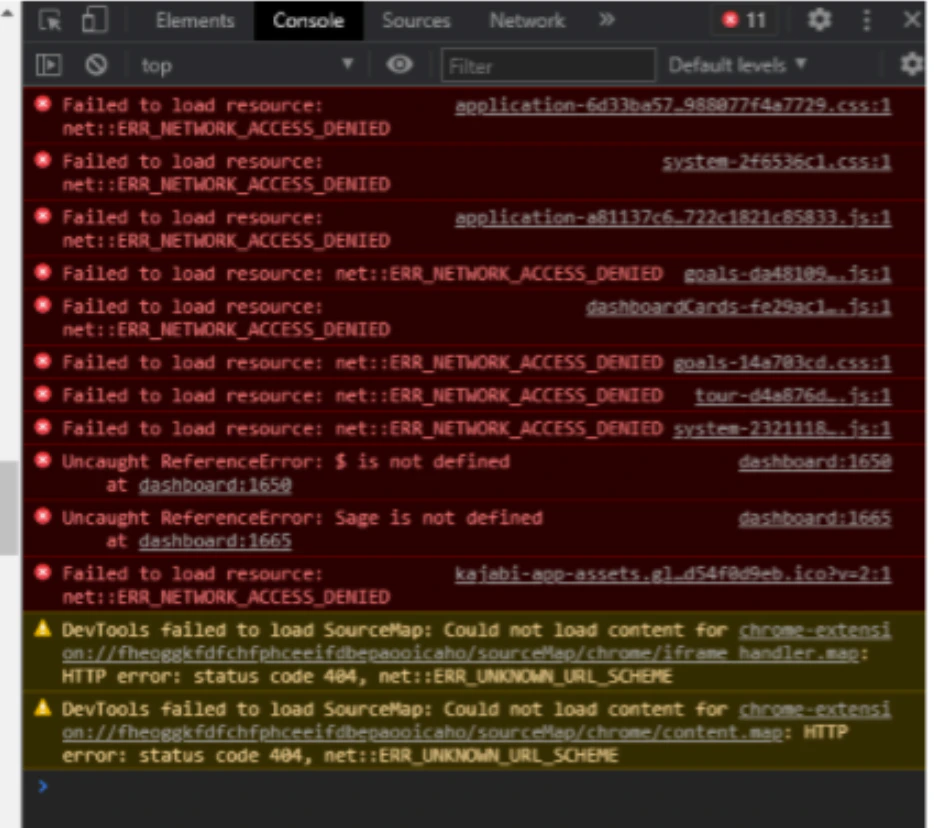 [Learn more about Chrome DevTools](https://developers.google.com/web/tools/chrome-devtools/console).
### Safari
#### Step 1. Enable the developer menu
[Learn to enable the developer menu with Safari's support guide](https://support.apple.com/guide/safari/use-the-developer-tools-in-the-develop-menu-sfri20948/mac).
#### Step 2. Open the developer menu in your Safari page
* With the page open on your Safari web browser, select the **Develop** tab.
* Then, select **Show Javascript Console**.
* Scroll through the page and locate any red errors with the descriptor "blocked by network" or similar language like "network access denied".
### Additional web browsers
* **Firefox**\
If you are using the Firefox web browser when the page fails to load properly, read Mozilla Firefox's support guide, [Browser Console](https://developer.mozilla.org/en-US/docs/Tools/Browser_Console).
* **Microsoft Edge**\
If you are using the Microsoft Edge web browser when the page fails to load properly, read Microsoft Edge's support guide, [Open Microsoft Edge DevTools](https://docs.microsoft.com/en-us/microsoft-edge/devtools-guide-chromium/open/?tabs=cmd-Windows).
* **Opera**\
If you are using the Opera web browser when the page fails to load properly, read Opera's support guide, [Testing and Debugging](https://dev.opera.com/extensions/testing/).
If your error console displays any red errors with the descriptor "blocked by network" or similar language like "network access denied", your antivirus software may be blocking your web content from properly loading.
Most commonly, antivirus softwares like McAfee have been known to cause problems with pages loading properly.
If you have McAfee installed on your device, read McAfee's guide on [How to enable or disable McAfee Net Guard](https://service.mcafee.com/?locale=en-IN\&articleId=TS101820\&fromSearch=true\&page=shell\&shell=article-view) to allow Kajabi to load properly on your device.
**Do you use a different antivirus software?**
If you are using a different antivirus software, check its support site for specific instructions on how to allow Kajabi programs with your installed software.
***
## Step 3. Contact your internet service provider
Lastly, if you have cleared your browser cache, tried a different browser, and updated your antivirus software, you may need to contact your internet service provider.
It's possible your internet service provider may be blocking the site content or may have cached an older version of the site.
**Note:** Are you experiencing issues with your custom domain not loading properly or DNS related issues? Check out this Help Center article on [managing your DNS records on Kajabi!](../../website/domains/how-to-manage-your-dns-records-on-kajabi) If you are still experiencing issues, please get in touch with [Kajabi Support](../../resources/support/how-to-contact-kajabi-support) for Custom Domain assistance.
[Learn more about Chrome DevTools](https://developers.google.com/web/tools/chrome-devtools/console).
### Safari
#### Step 1. Enable the developer menu
[Learn to enable the developer menu with Safari's support guide](https://support.apple.com/guide/safari/use-the-developer-tools-in-the-develop-menu-sfri20948/mac).
#### Step 2. Open the developer menu in your Safari page
* With the page open on your Safari web browser, select the **Develop** tab.
* Then, select **Show Javascript Console**.
* Scroll through the page and locate any red errors with the descriptor "blocked by network" or similar language like "network access denied".
### Additional web browsers
* **Firefox**\
If you are using the Firefox web browser when the page fails to load properly, read Mozilla Firefox's support guide, [Browser Console](https://developer.mozilla.org/en-US/docs/Tools/Browser_Console).
* **Microsoft Edge**\
If you are using the Microsoft Edge web browser when the page fails to load properly, read Microsoft Edge's support guide, [Open Microsoft Edge DevTools](https://docs.microsoft.com/en-us/microsoft-edge/devtools-guide-chromium/open/?tabs=cmd-Windows).
* **Opera**\
If you are using the Opera web browser when the page fails to load properly, read Opera's support guide, [Testing and Debugging](https://dev.opera.com/extensions/testing/).
If your error console displays any red errors with the descriptor "blocked by network" or similar language like "network access denied", your antivirus software may be blocking your web content from properly loading.
Most commonly, antivirus softwares like McAfee have been known to cause problems with pages loading properly.
If you have McAfee installed on your device, read McAfee's guide on [How to enable or disable McAfee Net Guard](https://service.mcafee.com/?locale=en-IN\&articleId=TS101820\&fromSearch=true\&page=shell\&shell=article-view) to allow Kajabi to load properly on your device.
**Do you use a different antivirus software?**
If you are using a different antivirus software, check its support site for specific instructions on how to allow Kajabi programs with your installed software.
***
## Step 3. Contact your internet service provider
Lastly, if you have cleared your browser cache, tried a different browser, and updated your antivirus software, you may need to contact your internet service provider.
It's possible your internet service provider may be blocking the site content or may have cached an older version of the site.
**Note:** Are you experiencing issues with your custom domain not loading properly or DNS related issues? Check out this Help Center article on [managing your DNS records on Kajabi!](../../website/domains/how-to-manage-your-dns-records-on-kajabi) If you are still experiencing issues, please get in touch with [Kajabi Support](../../resources/support/how-to-contact-kajabi-support) for Custom Domain assistance.