> ## Documentation Index
> Fetch the complete documentation index at: https://help.kajabi.com/llms.txt
> Use this file to discover all available pages before exploring further.
# Upload a website template
> Learn to upload website templates, export and import templates, and activate your fully customized templates.
Website design templates allow you to customize the look of your Standard Website Pages located in the Pages section of your Website tab. Each Website template can be customized independently from each other to help you create and design your brand. Learn to upload website templates, export and import templates, and activate your fully customized templates.
**Note:** This article covers the standard website page templates. [Click here to learn how to upload a landing page template](../../website/pages/how-to-upload-a-landing-page-template) or [click here to learn how to upload a course product template](../../products/courses/course-templates).
***
## Website templates
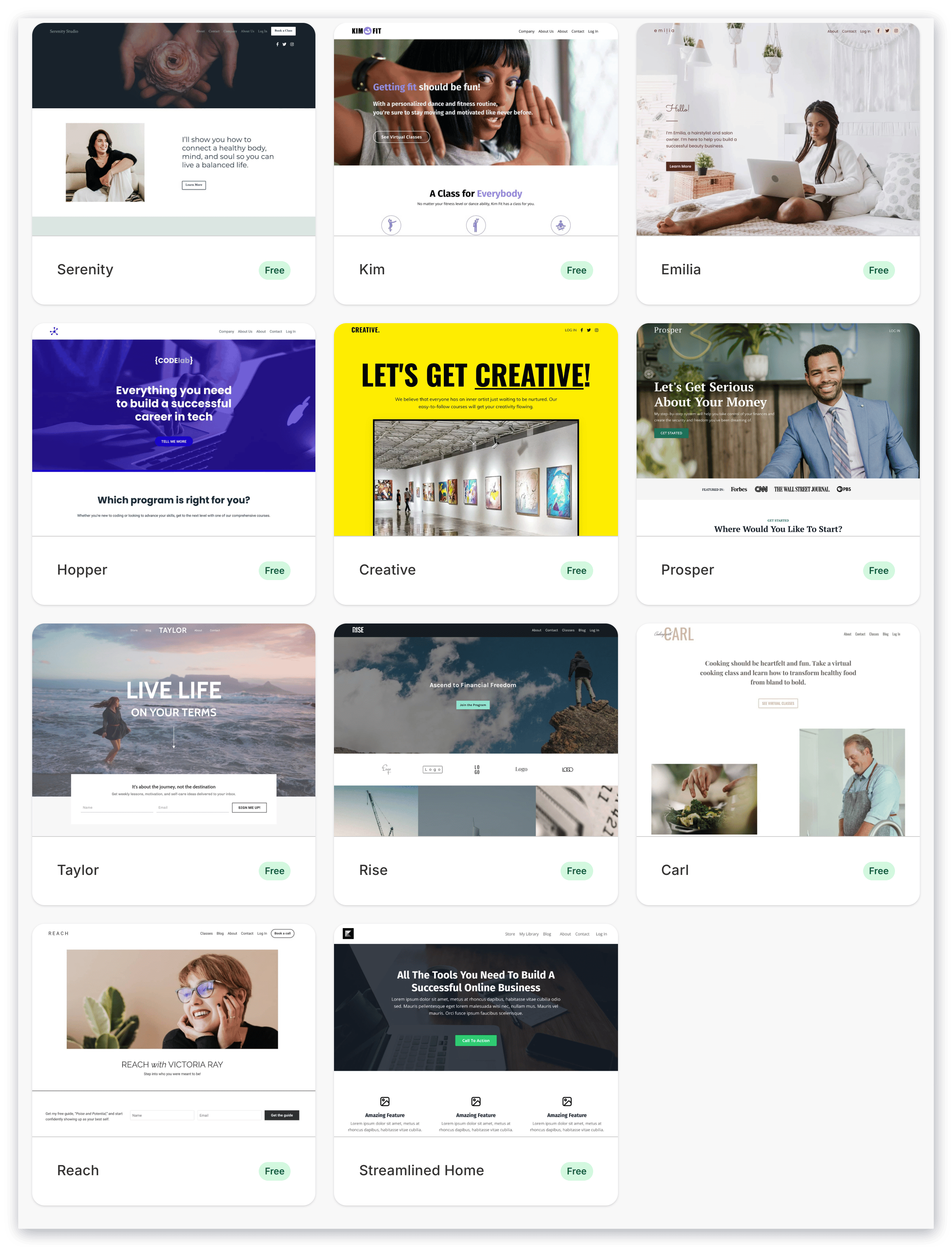
Design your [standard website pages](../../website/pages/customizing-your-website-pages-with-the-website-builder) with the ever-growing list of free stylized site templates, featuring intuitive settings and design flexibility:
 ***
## Add a template
Installing a template will automatically generate as an inactive template in your website design tab. This allows you to customize and edit your design behind-the-scenes until you are ready to activate (or make visible) for your website visitors.
### To add a template
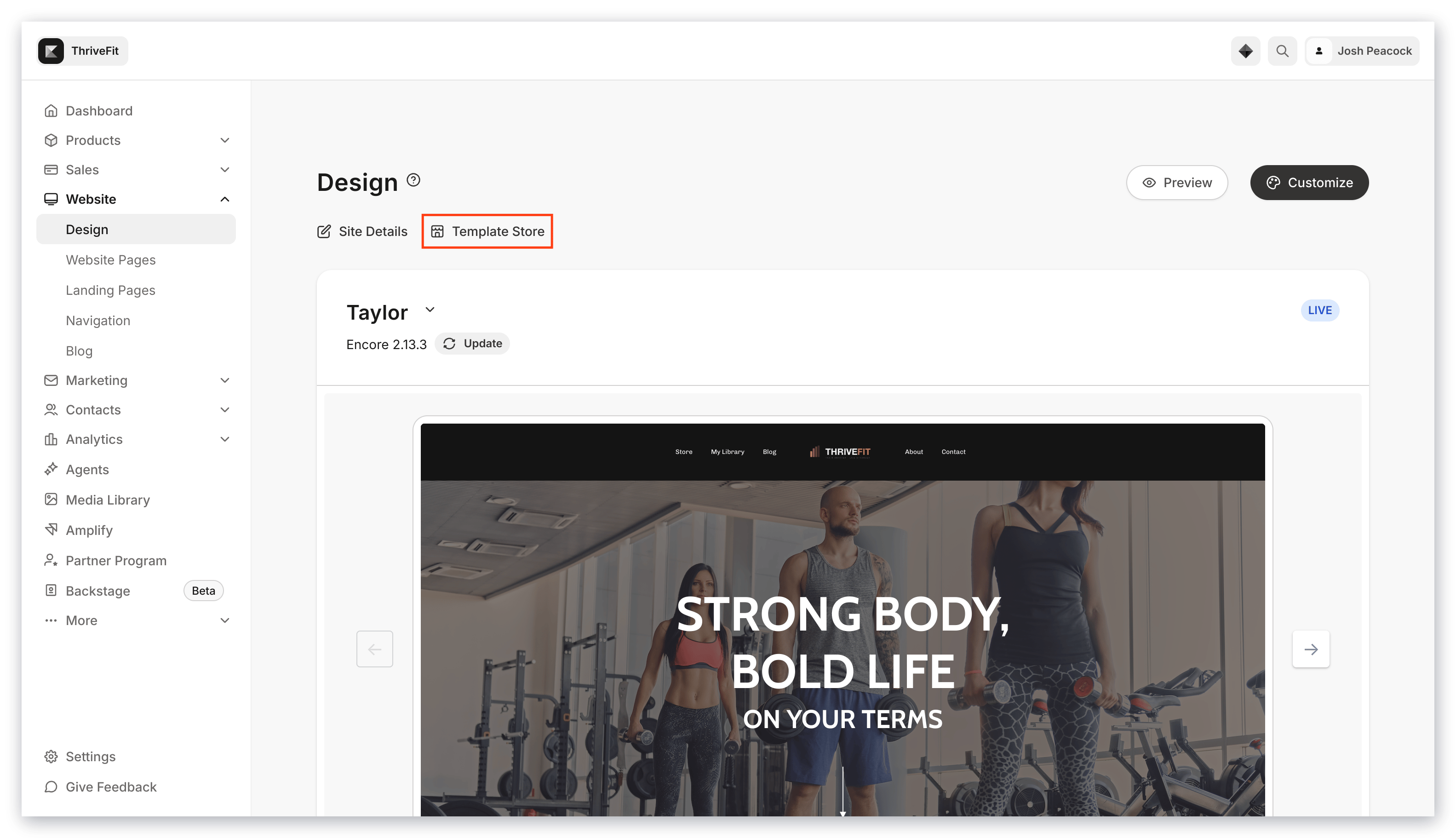
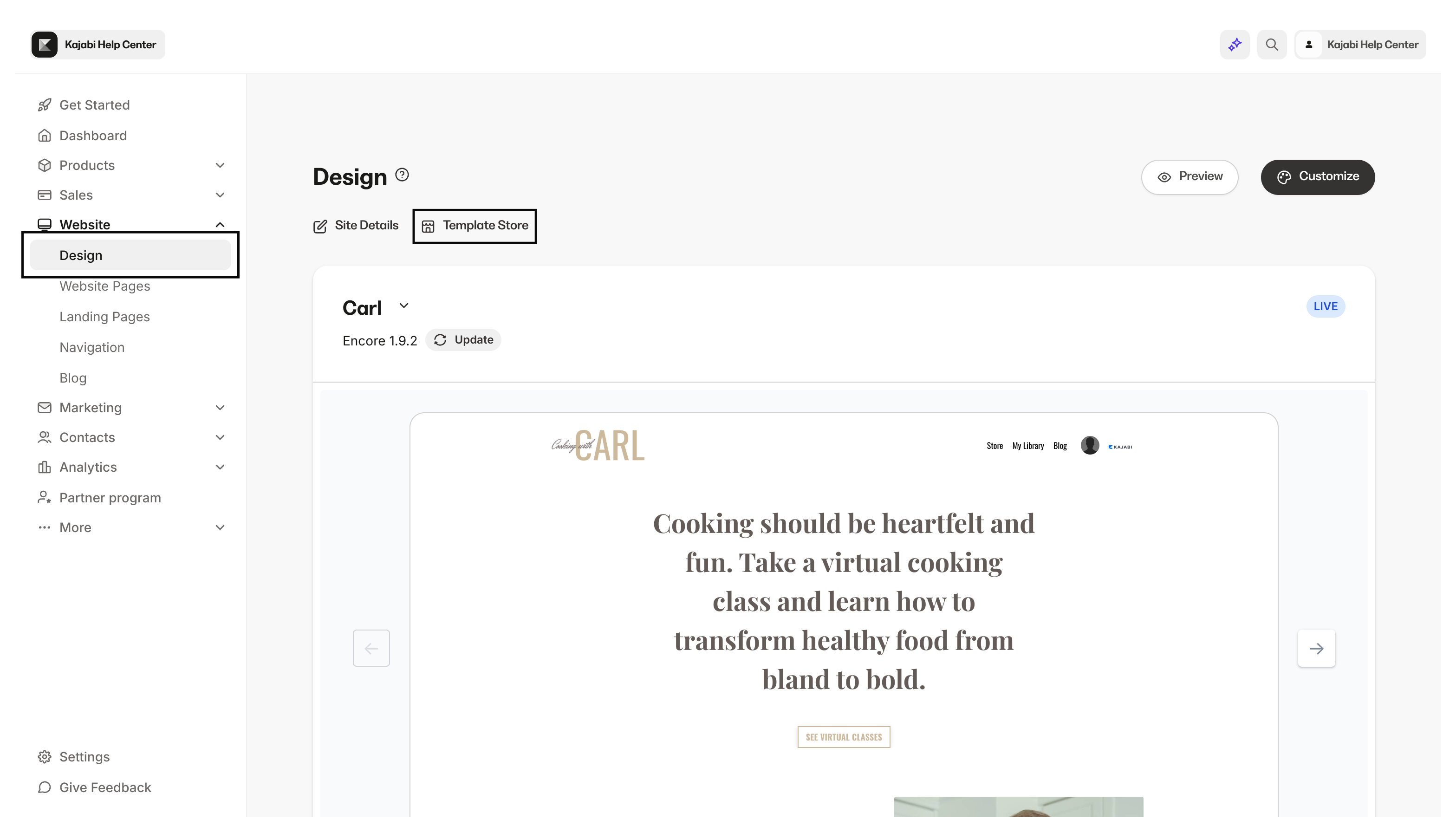
* Open the **Website** tab from your Dashboard.
* Click **Design**.
* Then, select **Template Store** from the top menu:
***
## Add a template
Installing a template will automatically generate as an inactive template in your website design tab. This allows you to customize and edit your design behind-the-scenes until you are ready to activate (or make visible) for your website visitors.
### To add a template
* Open the **Website** tab from your Dashboard.
* Click **Design**.
* Then, select **Template Store** from the top menu:
 * Select your **Template** from the Template Store.
* Click **Add to saved templates** to save the Template.
* Select your **Template** from the Template Store.
* Click **Add to saved templates** to save the Template.
After installing your template, customize your Standard Website Pages to fit your brand and business. [Learn to customize with the Website Builder](../../website/pages/customizing-your-website-pages-with-the-website-builder).
Navigate through your pages by using the dropdown menu in the bottom left corner of your page editor.
Then, when you are ready, activate your website template:
* Go to **Saved Templates**.
* Hover your cursor over the **Template**.
* Click **Set to live template**.
* Click **Set to live template** to confirm this action:
It is important to keep in mind that your activated Website Template will change the template for all of your [website pages](../../website/pages/customizing-your-website-pages-with-the-website-builder), but it will not impact your [standalone landing pages](../../website/pages/pages-overview#h_01F62KH7SNYC9TGKVSANMYDC7Z).
**Note:** Switching between website templates will not affect your content, comments, or admin settings.
***
## Rename your template
Rename your template to easily identify different templates you choose to add and Activate.
### To rename your template
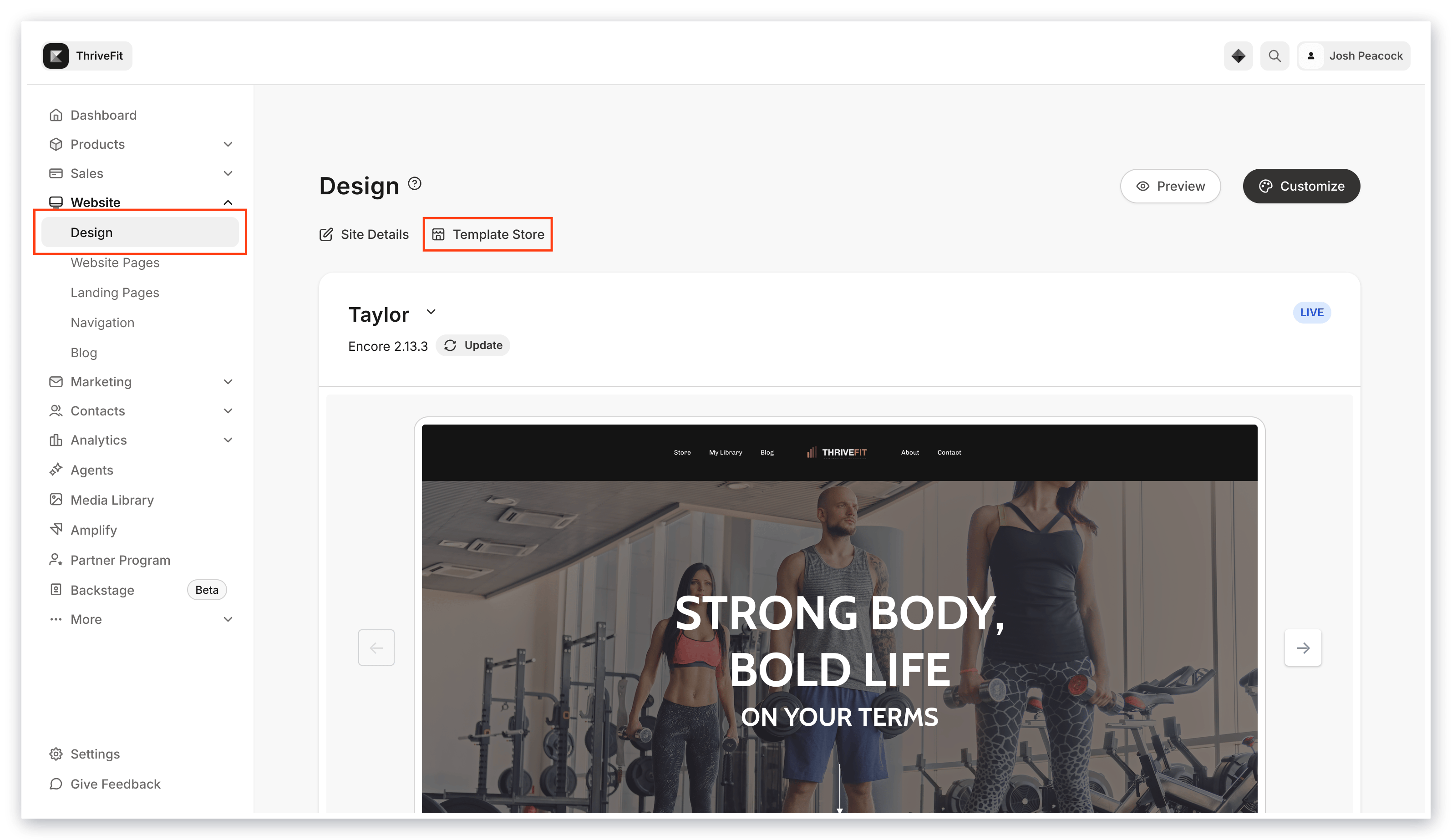
* Open the **Website** tab.
* Open the **Design** tab:
 * Go to **Saved Templates**.
* To the right of your Template Title click `…`.
* Select **Rename template**.
* Enter your desired Title in the **Name** text box.
* Click **Save**:
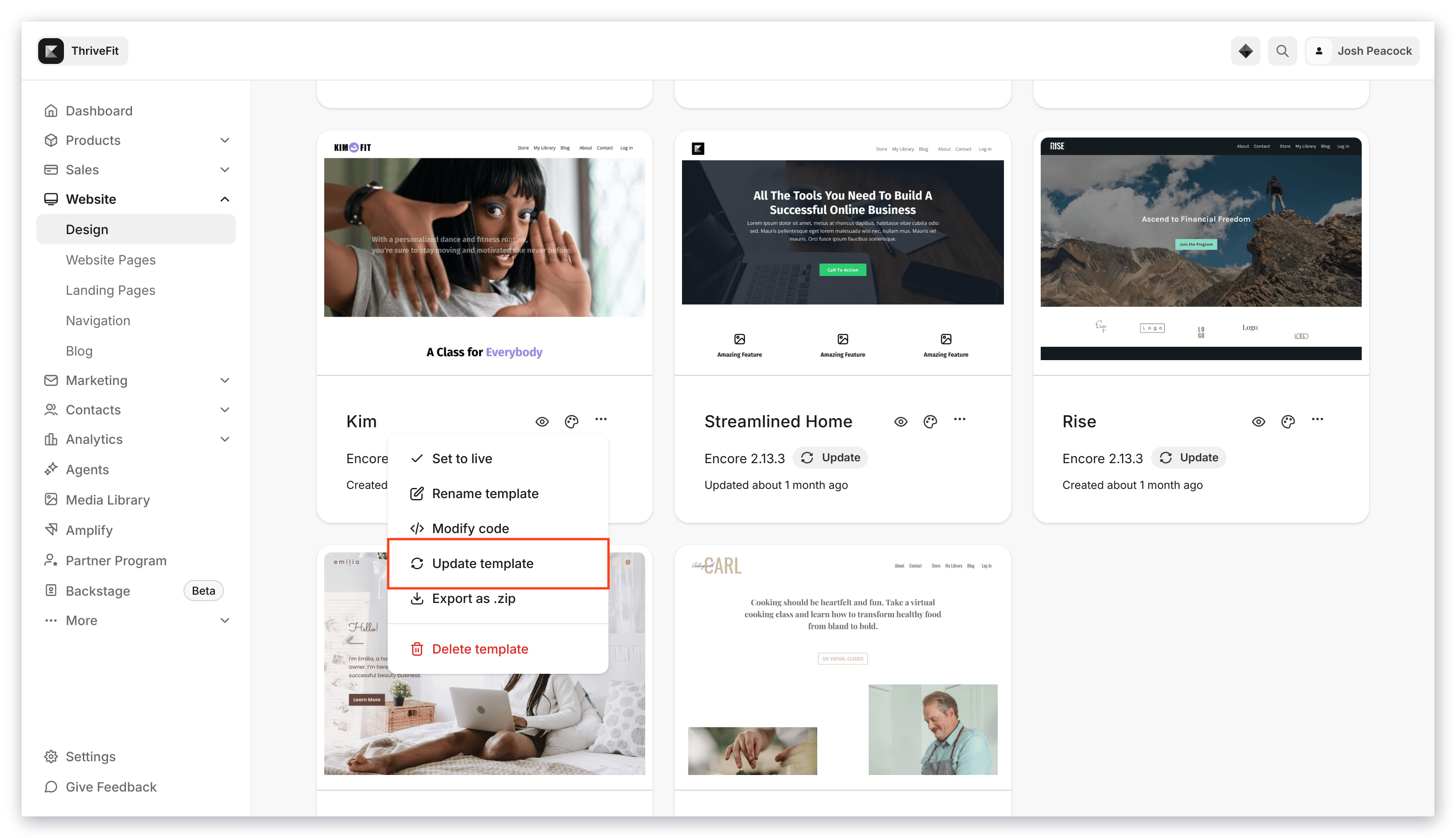
* Go to **Saved Templates**.
* To the right of your Template Title click `…`.
* Select **Rename template**.
* Enter your desired Title in the **Name** text box.
* Click **Save**:
***
## Update your template
Maintain your website template by regularly checking for updates. Your template may need to be updated to install bug fixes and features that will help improve your experience with your website.
[Click here to learn how to update your Website Template](../../website/pages/how-to-update-a-template#h_01EEXQE524GQB8SW6SY2HPBZCN).
 ***
## Export/Import a template
Export your template to share with your team or clients or simply save your template to an external hard drive.
To **Export** a template from your site:
* Open the **Website** tab from the Dashboard.
* Click the **Design** tab:
***
## Export/Import a template
Export your template to share with your team or clients or simply save your template to an external hard drive.
To **Export** a template from your site:
* Open the **Website** tab from the Dashboard.
* Click the **Design** tab:
 * Go to **Saved Templates**.
* Click the `…` next to your saved template and choose **Export as .zip**:
* Go to **Saved Templates**.
* Click the `…` next to your saved template and choose **Export as .zip**:
**Note:** The logged-in admin will be sent the exported template through email. Click on the link in the email to download the file. Save the exported template file to your hard drive.
### Import a template
Have a custom template built for your site on Kajabi? Import your file to the Website Design tab to add your custom website template.
To **Import** a template to your site:
* Open the **Website** tab from the Dashboard.
* Click the **Design** tab.
* Select **Upload Template.**
* Upload your file:
**Note:** There is a 10MB file limit when uploading a website template.