> ## Documentation Index
> Fetch the complete documentation index at: https://help.kajabi.com/llms.txt
> Use this file to discover all available pages before exploring further.
# What's new with Builder 2.0
> Learn about the most recent updates available with Builder 2.0.
## What's new
The latest updates to the Page Builder include:
* Refreshed visual design across the entire interface
* Updated and reorganized Sections for better clarity
* Redesigned search bar for faster, more intuitive navigation
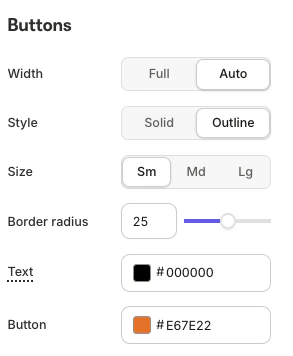
* Certain button toggles now follow the Page's Style Guide
* Undo button for quick and easy edits
This is just the beginning of Builder improvements. More exciting updates are on the way.
***
## How to upgrade
The first step to experiencing Builder 2.0 is to upgrade from your current version.
To do so:
* From the Kajabi Homepage, select the **Website** tab.
* Choose either **Website** or **Landing Pages.**
* Select the **page** you wish to edit.
* In the Builder, click **Explore and Upgrade** in the upper right corner.
* Click **Upgrade**:
**Note:**
Remember to upload your template Zip files to complete the Builder upgrade.
***
## Refreshed visual design
The refreshed left sidebar is the first thing you'll notice in the Builder. It's been simplified and cleaned up for a more streamlined experience. Content blocks are now reorganized to create a smoother, more intuitive flow as you build. Buttons are clearly labeled and do exactly what you expect, helping eliminate confusion and speed up your workflow:
***
## Cleaner sections and search bar
Creating a Section is now easier than ever. The redesigned Section view is clean, intuitive, and user-friendly, making it simple to browse and choose the right content. Looking for something specific? Just use the Search bar to find exactly what you need quickly:
***
## Style guide
Specific button toggles and customizations now follow the [Page's Style Guide](/articles/website/pages/customize-your-page-font-and-style-with-the-style-guide), ensuring a consistent and professional look across your design:
 ***
## Undo
Want to make further adjustments? Customizations are fully supported. Changed your mind? Just click **Undo** to revert any customization:
***
## Undo
Want to make further adjustments? Customizations are fully supported. Changed your mind? Just click **Undo** to revert any customization: