Cancel a Kajabi subscription and understand what happens afterward.
If you’re considering canceling your Kajabi account, the steps below cover the cancellation process and explain what to expect. Before proceeding, consider contacting our support team to discuss your options.
Click this link to cancel your account:Cancel AccountOr, follow these steps to cancel your account:
From the Dashboard, click your name in the top right corner. Then, select Account Settings.
Click Subscription in the sidebar.
Under Overview, click the Change plan button. Depending on your plan, this button may instead be labeled Upgrade plan.
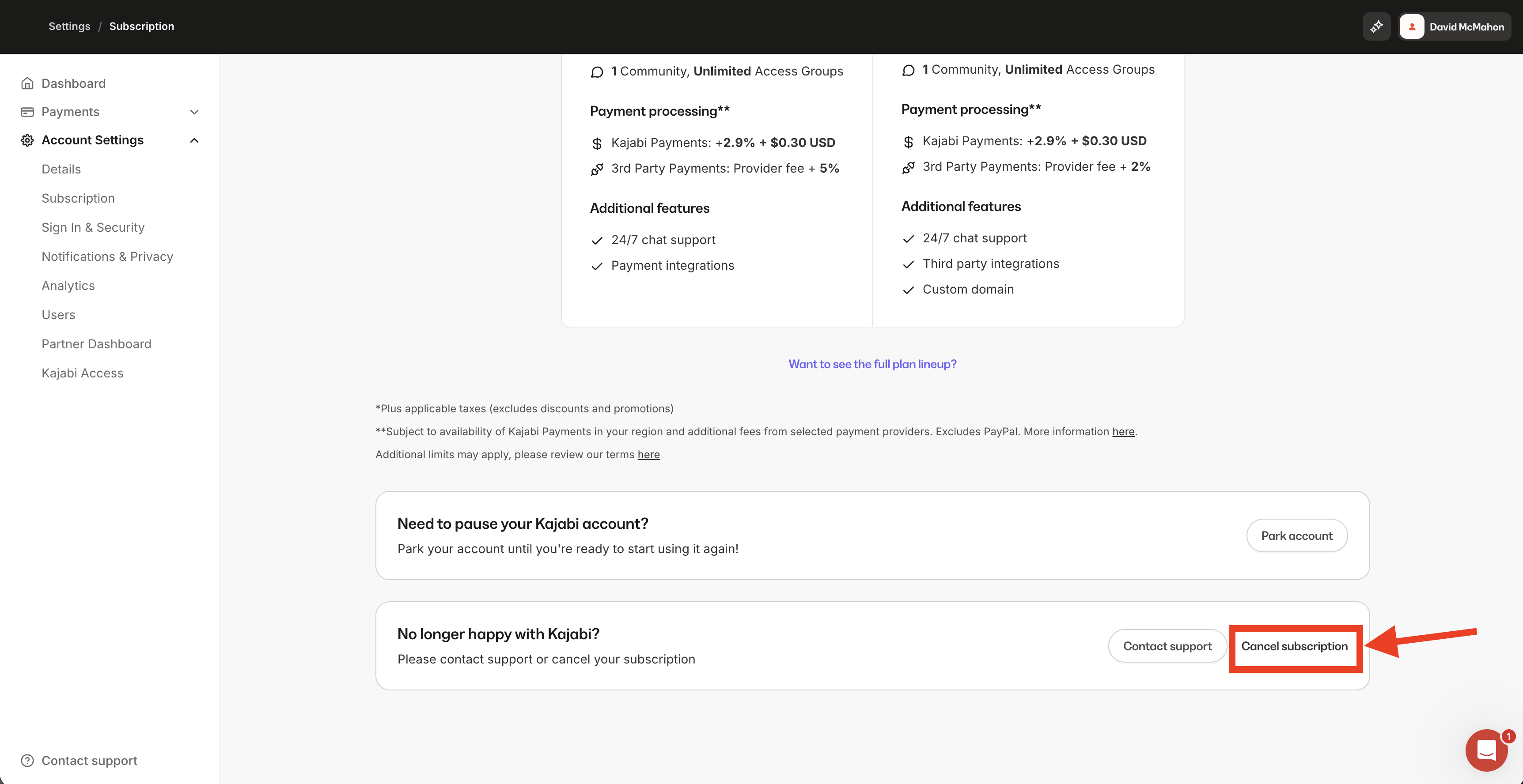
Scroll down the page, and under No longer happy with Kajabi?, click Cancel subscription.
Follow the indicated steps to complete your cancellation.
Note: If you don’t see a Change plan, Upgrade plan, or Cancel subscription control on your Subscription page at all, use the direct link above (Cancel Account) instead — the available controls can vary by plan type (for example, legacy plans).
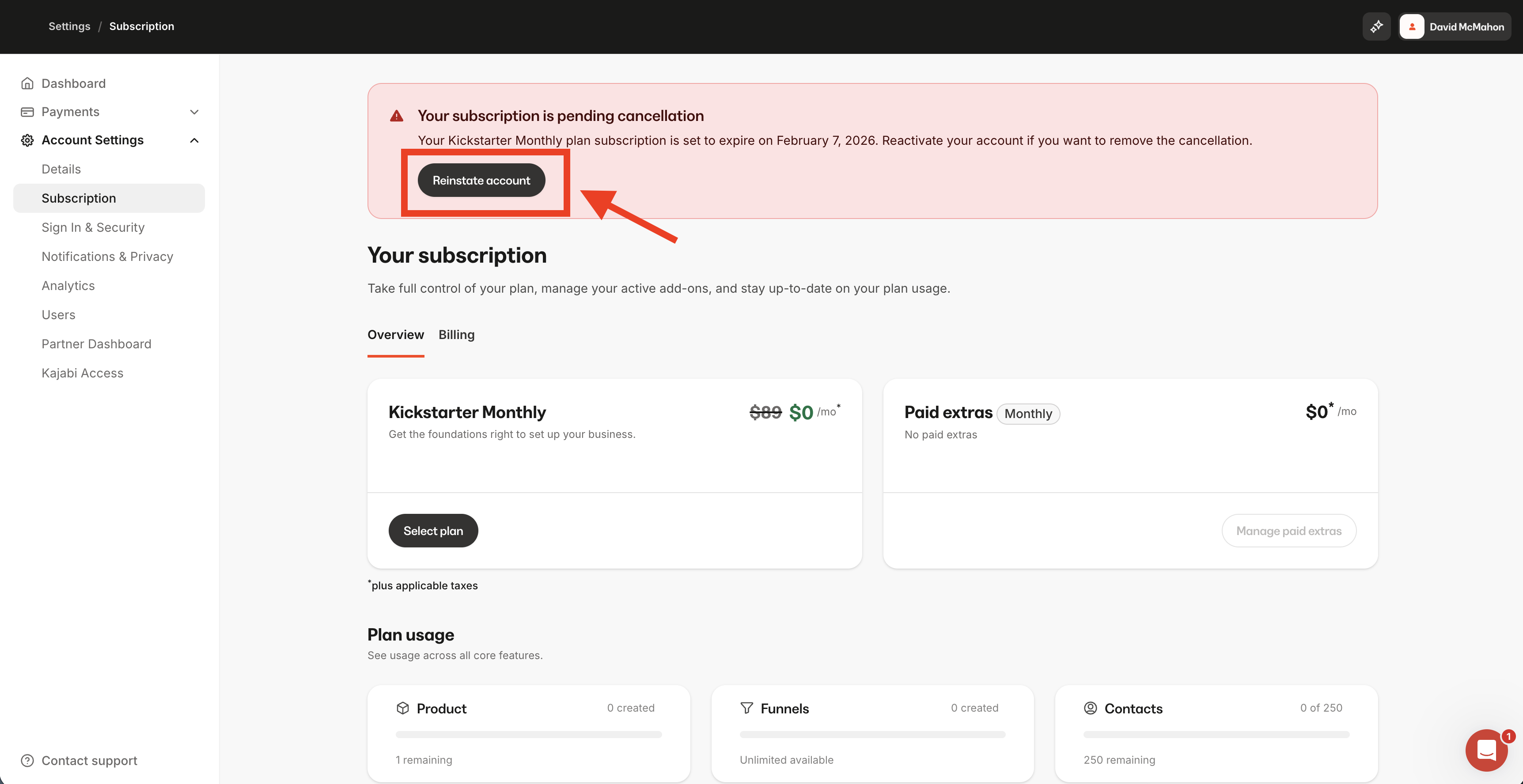
Note: If you do not see the option to cancel, check for a banner at the top of your Subscription page confirming your account is already scheduled for cancellation.
Canceling your Kajabi subscription will cancel all future Kajabi subscription payments and end access to your account (this includes access to your content and site) at the end of your current billing or trial period.On the date your account is set to cancel, your site will become inactive and inaccessible to your contacts and customers. This means your existing customers cannot log in to your canceled site and will lose access to the Products they have purchased. We highly recommend downloading your important content or data, such as course videos or customer lists, before your cancellation date.
Site and Member Access: Your site and member access, including email functionality, will be unavailable until the account is reactivated.
Custom Domain Disconnection: Any connected custom domain will be automatically disconnected.
Email Hosting: Kajabi does not host your personal or business email inbox. If your site goes down, you can still access your email through your email provider. Kajabi only sends marketing and transactional emails on your behalf.
In accordance with our Privacy Notice, any customer data may be deleted 90 days after your account termination. Data permanently removed after 90 days cannot be recovered. Visit your Subscription Settings to review the date your account is set to cancel. Learn how to update your Billing Settings. Kajabi sends reminder emails 14 days and 7 days before the final deletion date.Additionally, if granted a 48-hour temporary access extension, your account will remain accessible during that period, allowing you to resolve overdue payments or reactivate your subscription to prevent permanent loss.
Are my customers still charged after I cancel my Kajabi account?
Yes, Kajabi gives you full control over your payments and accounting with Kajabi Payments or by connecting third-party payment processors with Stripe and PayPal to process your payments.This allows you to determine how and when you want to handle your active recurring subscriptions through your Kajabi Payments account or your Stripe and/or PayPal account(s) if you plan to cancel your Kajabi account and choose to move to a different platform.After canceling your account, your customers will no longer have access to the digital products built with Kajabi but will maintain their subscription payments until manually canceled by you or your customer.
As a Kajabi Partner, will I still receive a commission for my referrals?
No, to remain eligible for commissions earned from your referrals as a Kajabi Partner, you must maintain your Kajabi account. If you choose to return and reactivate your account as a Kajabi Partner, you will return as a new Kajabi Partner and will not maintain your previous Partner Status.
Yes. Learn to pause your Kajabi account by parking your account and site. Parking gives you time away from building your business with Kajabi while preserving your work.While parked, customers cannot access purchased products. Reactivating your account fully restores access to all features and customer products.
How can I access my content or data if my account is already canceled?
To regain access, you need to reactivate your subscription by choosing one of our in-market plans. The Parked Plan does not grant access to your content or site editing features.
What happens if I downgrade my Kajabi plan rather than cancel?
When switching to a lower-tier plan with reduced product limits, products exceeding the limit will need to be removed prior to downgrading. Permanently deleted products cannot be recovered, and while a full backup of courses isn’t possible, individual lesson videos can be manually downloaded. Retaining a higher tier ensures all content remains intact within plan limits.