

ConvertKit is an email marketing service for running email marketing campaigns. With ConvertKit, create opt-in forms, tag subscribers, set-up automation, and send email follow-up messages.Documentation Index
Fetch the complete documentation index at: https://help.kajabi.com/llms.txt
Use this file to discover all available pages before exploring further.
Activate the ConvertKit integration
Get the ConvertKit API Key
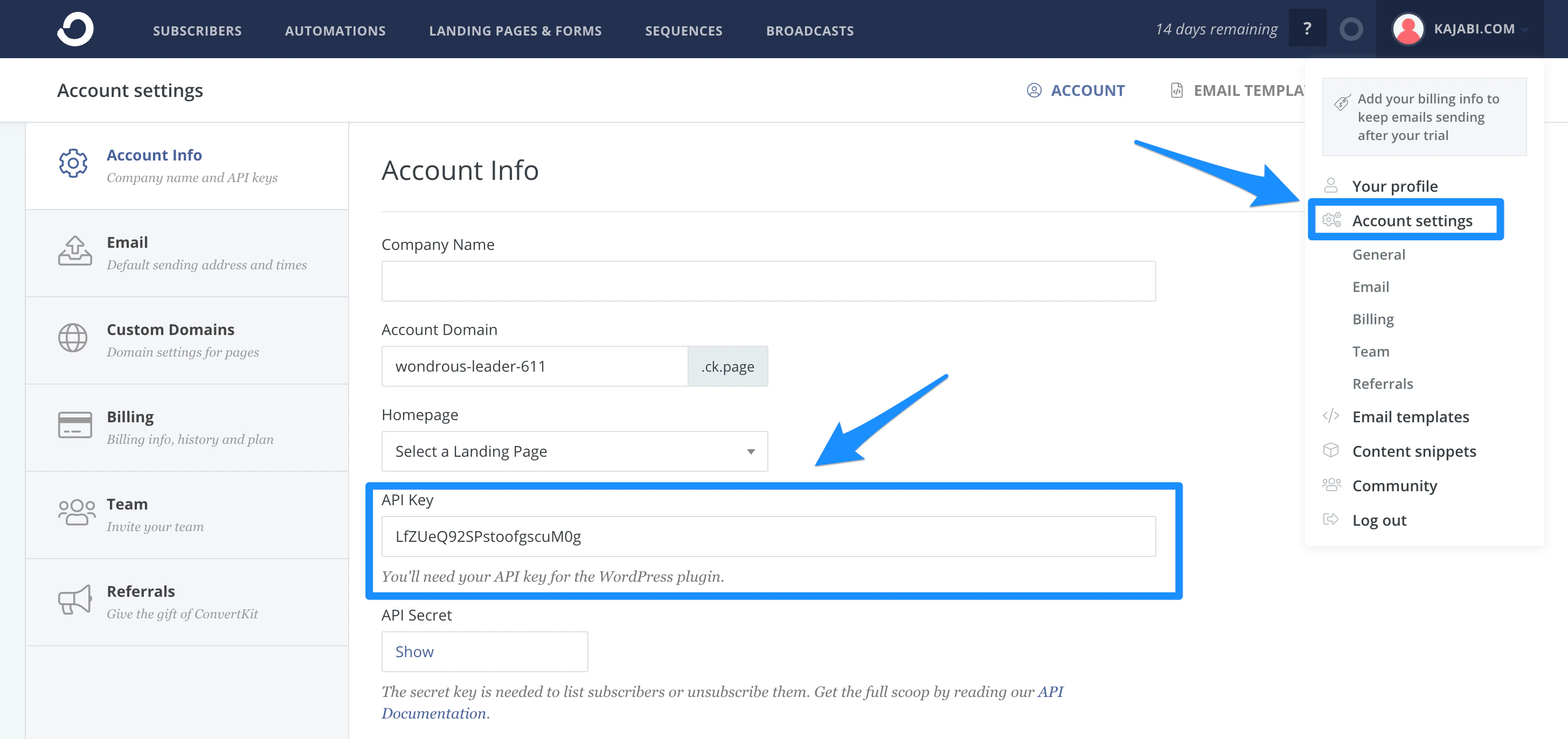
- Go to Account Settings.
- Copy the API Key:
Activate the ConvertKit integration in Kajabi
- Open the Settings tab.
- Select Third Party Integrations.
- Toggle On the ConvertKit integration.
- Paste the ConvertKit API Key.
- Click Save:
Add the ConvertKit Form ID to a Kajabi Form
Get the ConvertKit Form ID
- Create a new Form (Tip: Enable double opt-in on your ConvertKit Form).
- Copy the Form ID from the Form page URL.
Add the Form ID to Kajabi
- Create a new Form or edit an existing one (Tip: Disable double opt-in from your Kajabi Form to avoid duplicate emails).
- Check the box next to “Send the contact to a third party email provider”.
- Select ConvertKit.
- Paste the Form ID:
- Click Save at the top right of the page.