

Note:
The Affiliates feature is only available with Growth and Pro Plans. See kajabi.com/pricing for more details.
Commission statuses
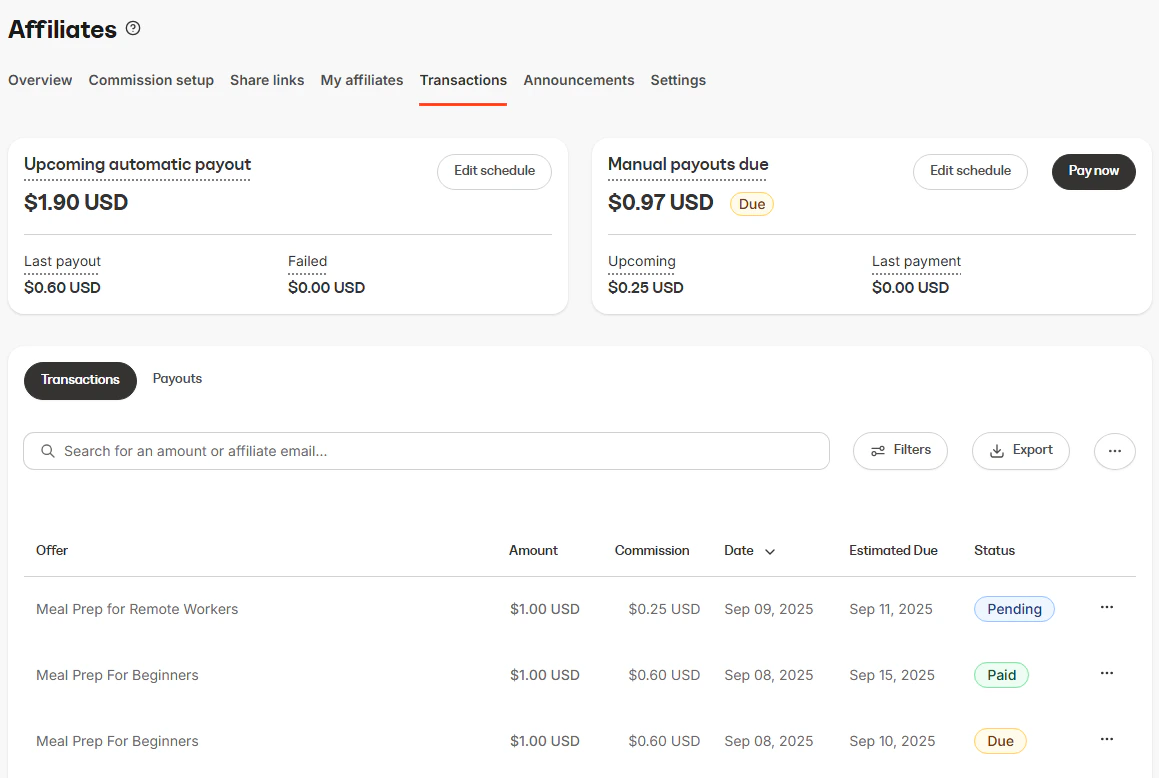
Every affiliate commission displays a clear Status indicator so you can instantly see where it stands in the payout process:- Pending - The commission is recorded but not yet eligible for payout according to your delay schedule.
- Due - The commission has met the payout delay requirements and is now payable.
- Paid - The commission has been paid out to your affiliate.
- Canceled - The commission was canceled and will not be paid out.
Finalized statuses
Once a commission is Paid or Canceled, it’s finalized and cannot be changed anymore.Payouts
When commissions become Due, they are eligible to be paid either manually or automatically.- Navigate to the Payouts Due cards on your Affiliate Transaction page.
- Determine your preferred Payout Method, Manual or Automatic.
- Set up a Payout Schedule to keep transactions organized and set reminders to pay commissions.
- Once your Affiliates generate sales and their associated transactions are Due according to your Payout Schedule, they’re ready to be paid out. Learn more about Managing Affiliate Payouts and Commissions.