

Documentation Index

Fetch the complete documentation index at: https://help.kajabi.com/llms.txt

Use this file to discover all available pages before exploring further.

Backstage is a private, branded space you create for each 1:1 client. It is built for high-touch Heroes, like coaches, consultants, and mentors, whose value comes from personalized work, not just content. Instead of stitching together several tools, every client gets one home for their program with their own progress, messages, and assignments.

How Backstage works

Each Backstage is a private, 1:1 relationship between a Hero and a client. The Hero manages every active client from a single dashboard, assigning tasks, sharing resources, sending messages, and scheduling sessions. The client logs into a personalized space that shows what’s next, what’s outstanding, and how to reach their Hero.

Add Backstage to an Offer

Backstage is activated when a Hero attaches it to an Offer. Any client who purchases that Offer automatically receives a Backstage seat.
  1. From the Dashboard, navigate to Sales > Pricing
  2. Open the Offer you want to attach Backstage to, or create a new Offer
  3. In the Products in this Offer section, choose to include Backstage
  4. Save the Offer
Important: When adding Backstage to an Offer, Kajabi informs you on how many remaining Backstage seats you have available on your current Kajabi Plan.When a client purchases an Offer that includes Backstage:
  • The client receives a welcome message in Backstage from the Hero
  • One Backstage seat is counted toward your account’s monthly seat allowance

What clients see in their Backstage

A client logs into Backstage and lands on their personalized dashboard. The first-time experience is designed to make the relationship feel intentional, even before the Hero has assigned anything. Backstageclient Clients can:
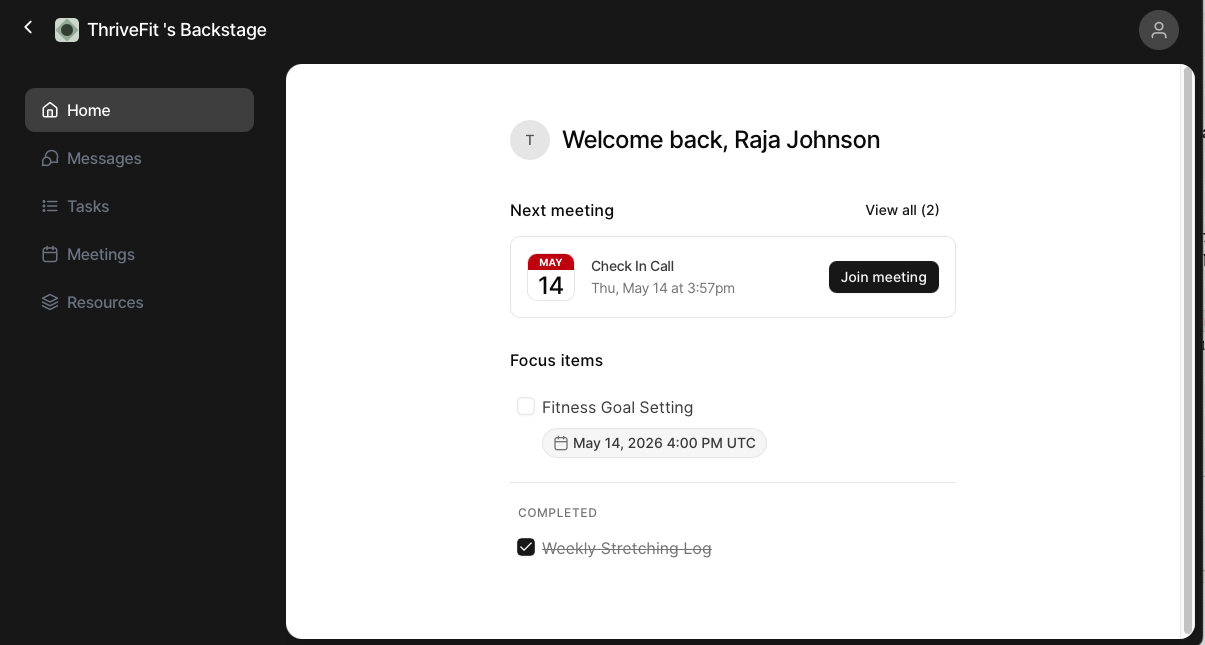
  • Read the Hero’s welcome message and current focus
  • View and complete assigned tasks
  • Open assigned resources like lessons, videos, files, or links from anywhere in the Hero’s library
  • Send and receive direct messages, attachments, and voice notes with the Hero
  • See upcoming live sessions and past session recordings
  • Track their progress across the program
Note: Clients can always browse the full library. Backstage is a personalized lens, not a locked-down replacement.

Manage clients from the Backstage dashboard

The Backstage dashboard is the Hero’s command center for active client relationships. Instead of a static client list, the dashboard surfaces who needs attention, who is thriving, and where to focus next. Dashboard2 From the dashboard, Heroes can:
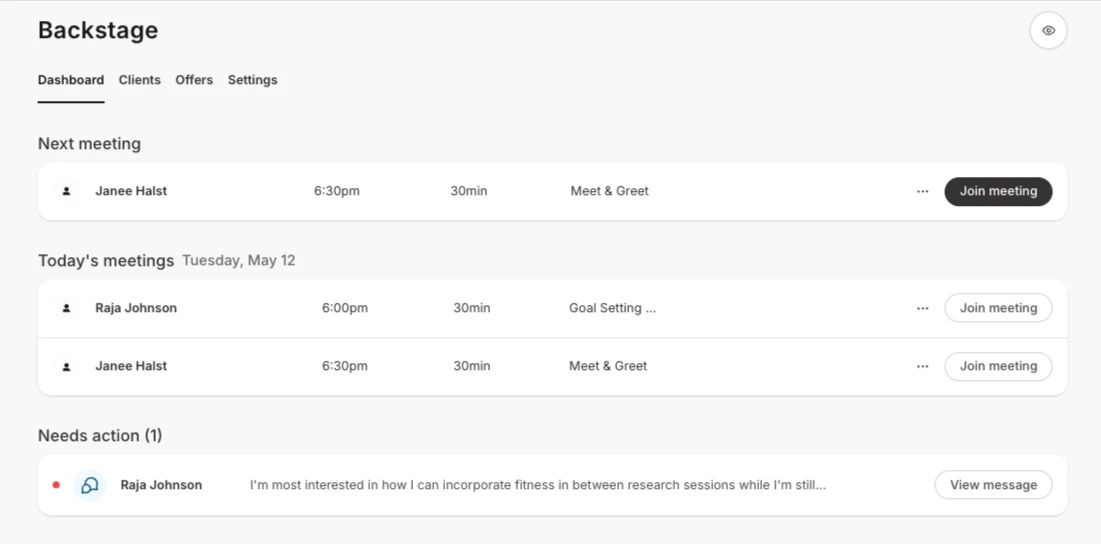
  • See engagement signals for each client — last activity, open messages, task completion
  • Sort clients by who needs attention first
  • Take quick actions — send a message, assign a resource, or schedule a session — without opening the full client view
  • Open any client’s Backstage to see everything in one place
Heroes can preview the client view for any active Backstage. Use this to check what a client sees before onboarding new clients into the experience.

Send messages, voice notes, and resources

Backstage messaging is a private 1:1 thread between the Hero and the client. It is the primary communication channel inside Backstage.  Messaging Messaging supports:
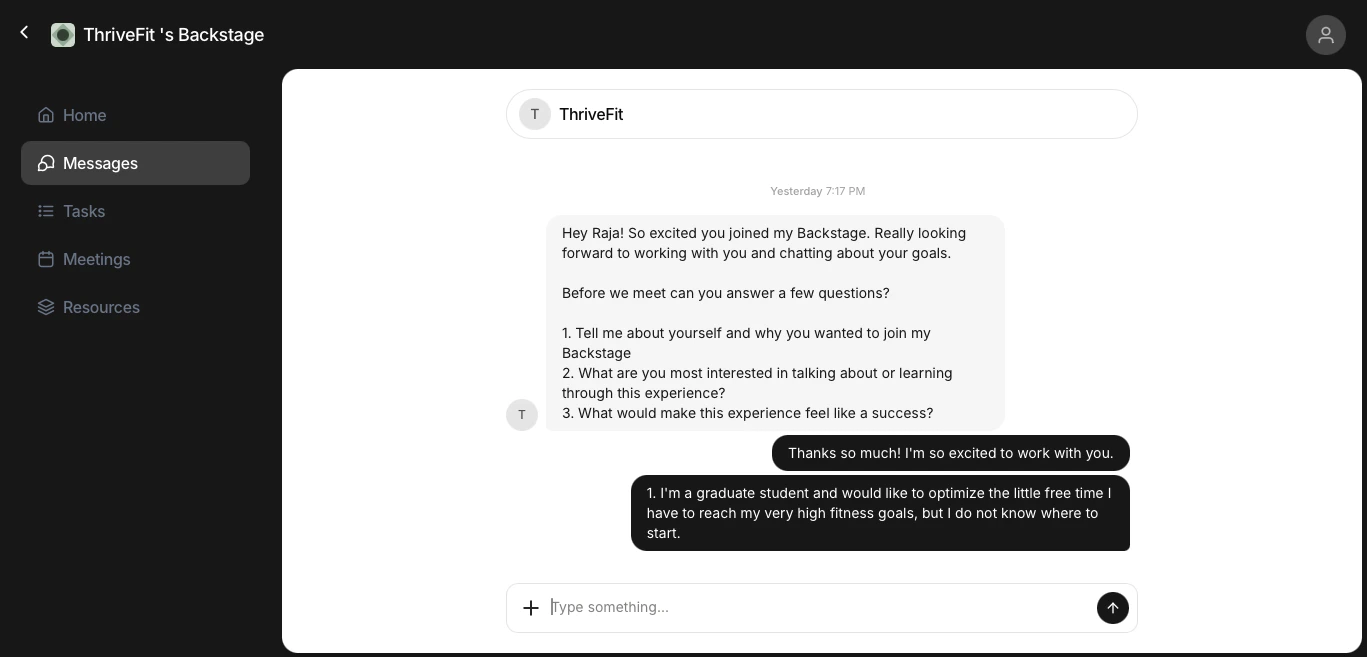
  • Text messages with read indicators
  • File attachments: images, documents, and other files
  • Voice notes: recorded audio messages, with playback speed controls and automatic transcription so messages stay accessible when listening isn’t an option
  • Resource links: drop a lesson, module, media library asset, or digital download directly into the conversation
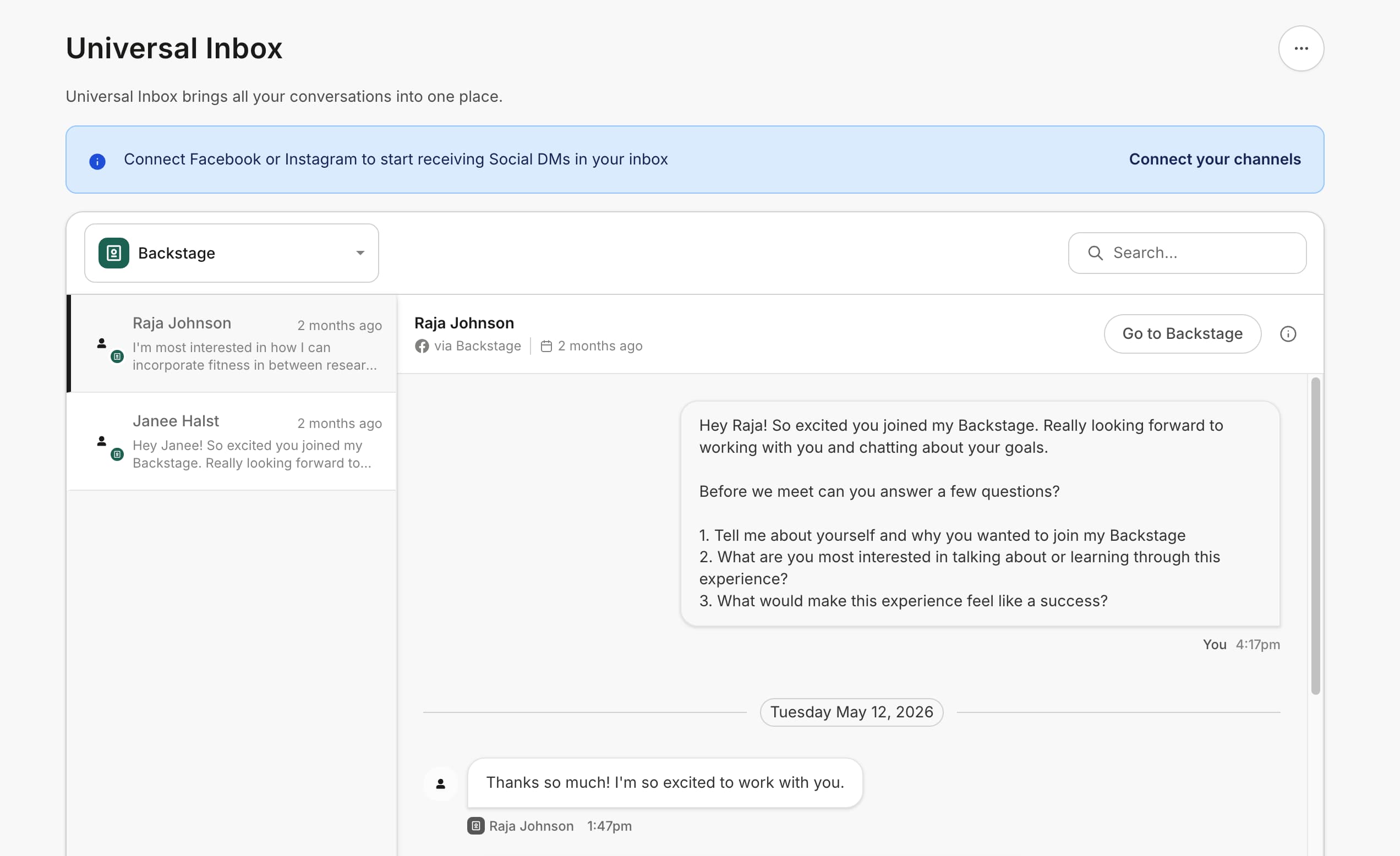
Both sides receive notifications when something new is waiting, so the engagement loop stays active even when neither party is logged in at the same time.

Assign tasks and resources

Tasks and resources turn Backstage from a chat thread into a guided, accountable program. Heroes assign a task to a client with a title, and optional due date. Clients check the task off as they complete it. Tasks live alongside messages so Heroes can turn a conversation into a follow-up assignment without leaving the thread. Tasksbackstage Heroes can assign the following resources:
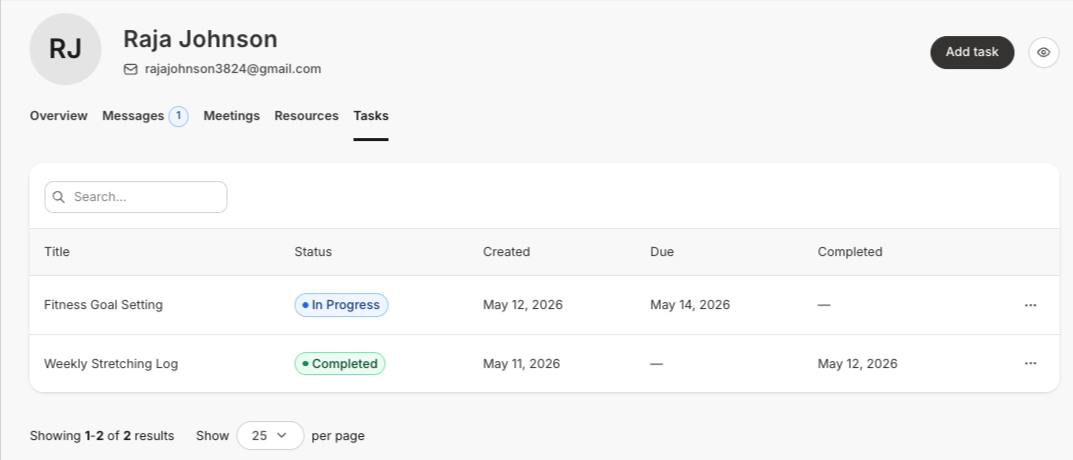
  • Lessons from any existing Course, even if the client has not already purchased/been granted access to the Course.
  • Entire module from any existing Course
  • Digital downloads
  • Any file from the media library
  • External links

Schedule and run live sessions

Backstage live sessions integrate Hero-to-client meetings directly into the client’s space. From the Hero side, sessions can be scheduled, run, and reviewed inside Backstage.  Scheduling Backstage Clients can:
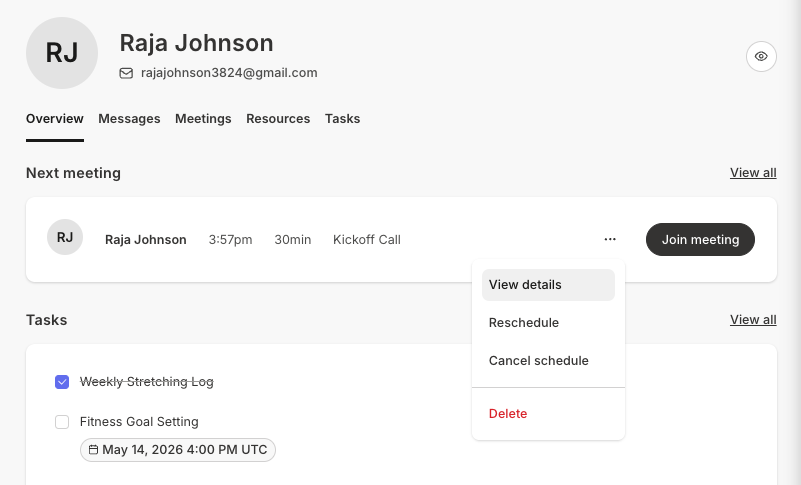
  • See upcoming sessions on their dashboard
  • Schedule sessions
  • Join sessions when the time comes
  • Watch recordings of past sessions
  • Download transcriptions and meeting summaries that are automatically generated after the meeting ends

Backstage seats and pricing

Backstage uses a per-active-seat pricing model, with included seats determined by your Kajabi plan. Heroes choose which Offers include Backstage, so seat usage is always tied to a deliberate packaging decision.
PlanIncluded seatsAdditional Seat Price
Basic1$20/seat/month
Growth5$20/seat/month
Pro/Founders10$20/seat/month
Important: For a limited time, early-adopters can purchase additional seats for $10/seat/month.
Warning: Backstage is not available on the Kajabi Kickstarter plan.
A few important notes:
  • Annual plan discounts apply to your Kajabi plan only. Backstage seat overages are always billed monthly.
  • Paused or canceled clients release their seat at the next billing date. There are no partial-month refunds.
  • Only pay for what you use: Any seats utilized beyond your plan limit are automatically added to your subscription. Once you revoke access to extra seats, you’ll be refunded for the unused time.

Backstage vs. Coaching

Backstage and Coaching are two independent Kajabi Products. They solve different problems and choosing the right one depends on how you deliver your work. Coaching is built around scheduled live sessions. The core experience is the calendar; a Hero books sessions with their clients, runs them live (1:1 or in a group), and clients return to their Coaching Program for upcoming session details and per-session resources. Backstage is built around the ongoing, async relationship with a single client. The core experience is the client’s personal dashboard. A Hero assigns tasks, shares resources, exchanges messages and voice notes, and runs the occasional live session, all inside one private space the client returns to between conversations.
BackstageCoaching
Best forOngoing 1:1 client transformation between live conversationsPrograms centered on scheduled live sessions
Relationship structure1:1 only1:1 or Group
Live sessionsYes - typically ad-hoc meetings. You do not connect a scheduler.Yes - you connect a scheduler so that either the Hero or the client can schedule sessions.
Async messagingYes - direct messages, file attachments, and voice notes with transcriptionNot included
Tasks and accountabilityYes - assignable and trackable per clientNot included
ResourcesPulled from across the Hero’s library and shared per clientAttached per session
Per-client dashboardYes - one private space per clientNo - clients return to the Coaching Program product in their Library
PricingPer active Backstage seat, on top of your Kajabi PlanIncluded with your Kajabi plan

FAQs

Who is Backstage for? Coaches, consultants, mentors, advisors, and any expert whose value is personal and 1:1. Backstage is built for the kind of work where each client gets a curated experience — not a course they download or a cohort they join, but a private space tailored to their goals. The relationship is the product, and Backstage is where you deliver it. If you’re selling access to you, this is where it lives. Can I run group programs in Backstage? No. Backstage is designed for private 1:1s only. Group programs and cohorts are not supported. Does Backstage replace Kajabi Coaching? No. They’re two independent products that solve different problems. Coaching is built around scheduled live sessions — calendar-first, 1:1 or group — and is ideal for cohorts and structured programs.  Backstage is a private, curated workspace for each individual 1:1 client — messages, voice notes, recorded sessions, tasks, and resources you pull from your library, all in one home per relationship. Use either or both depending on your business model. What happens when a client cancels? The Backstage seat is released. If the client was on a subscription the seat is released at the end of their current billing cycle. Can clients see other clients? No. Each Backstage is a private space between the Hero and a single client. Clients cannot see one another or each other’s content. Can I preview what a client will see? Yes. Heroes can preview the client view of any active Backstage to check the experience before onboarding new clients. Does messaging support voice and video? Backstage messaging supports text, file attachments, and voice notes (with automatic transcription). Video isn’t supported in messaging. For video conversations, schedule a live session.