

Why this matters
DMARC works hand-in-hand with SPF (Sender Policy Framework) and DKIM (Domain Keys Identified Mail) to prevent bad actors from spoofing your email address. Moving to a Strict DMARC policy:- Protects your brand reputation from phishing and impersonation attempts.
- Keeps your messages out of spam folders and safely in subscribers’ inboxes.
- Future-proofs your email deliverability as major providers adopt stricter standards.
Why your sending address includes kjbm
Every custom email domain connected to Kajabi sends from a kjbm subdomain, so your marketing emails show a From address like:
kjbm is a sending subdomain — a separate branch of your domain that Kajabi uses exclusively for marketing email, leaving your root domain untouched. It’s required, and it can’t be removed, renamed, or hidden.
Three reasons it works this way:
- It protects your existing email. Your root domain likely already has SPF, DKIM, DMARC, and MX records pointing at your webmail provider. Adding Kajabi’s records at the root would collide with those — most often breaking a Google Workspace or Microsoft 365 inbox. Under
kjbm, the two systems never overwrite each other. - It isolates your sending reputation. Mailbox providers score reputation per subdomain. If a campaign draws spam complaints, the impact stays on
kjbm.yourdomain.comand your day-to-day business email keeps its clean record. - It makes strict authentication possible. Gmail, Yahoo, Microsoft, and T-Online now require SPF, DKIM, and DMARC alignment for bulk senders. A dedicated sending subdomain lets Kajabi publish a complete, aligned authentication set without you reconciling it against your webmail provider’s records.
What you need to do
The steps you take depend on whether Kajabi or your DNS provider manages the DNS for your custom email domain.Note: You will not see an Enable Strict DMARC button if this is your first time setting up your custom email domain. Kajabi requires the
kjbm subdomain to your custom email domain as part of the set up — you cannot complete setup without adding it.Custom email domains managed by Kajabi
No action is required from your side.For Kajabi-managed DNS, your custom email domain is automatically updated. You will seekjbm added to the beginning of your domain (for example, username@kjbm.yourdomain.com).
Custom email domains managed by your DNS provider
If you manage your own DNS provider, you will see an Enable Strict DMARC button to stay compliant and maintain high deliverability:- From your Kajabi dashboard, open Settings.
- Under Site settings, click Marketing settings.
- Scroll down to Email Settings, click Enable Strict DMARC to view your DMARC record information:
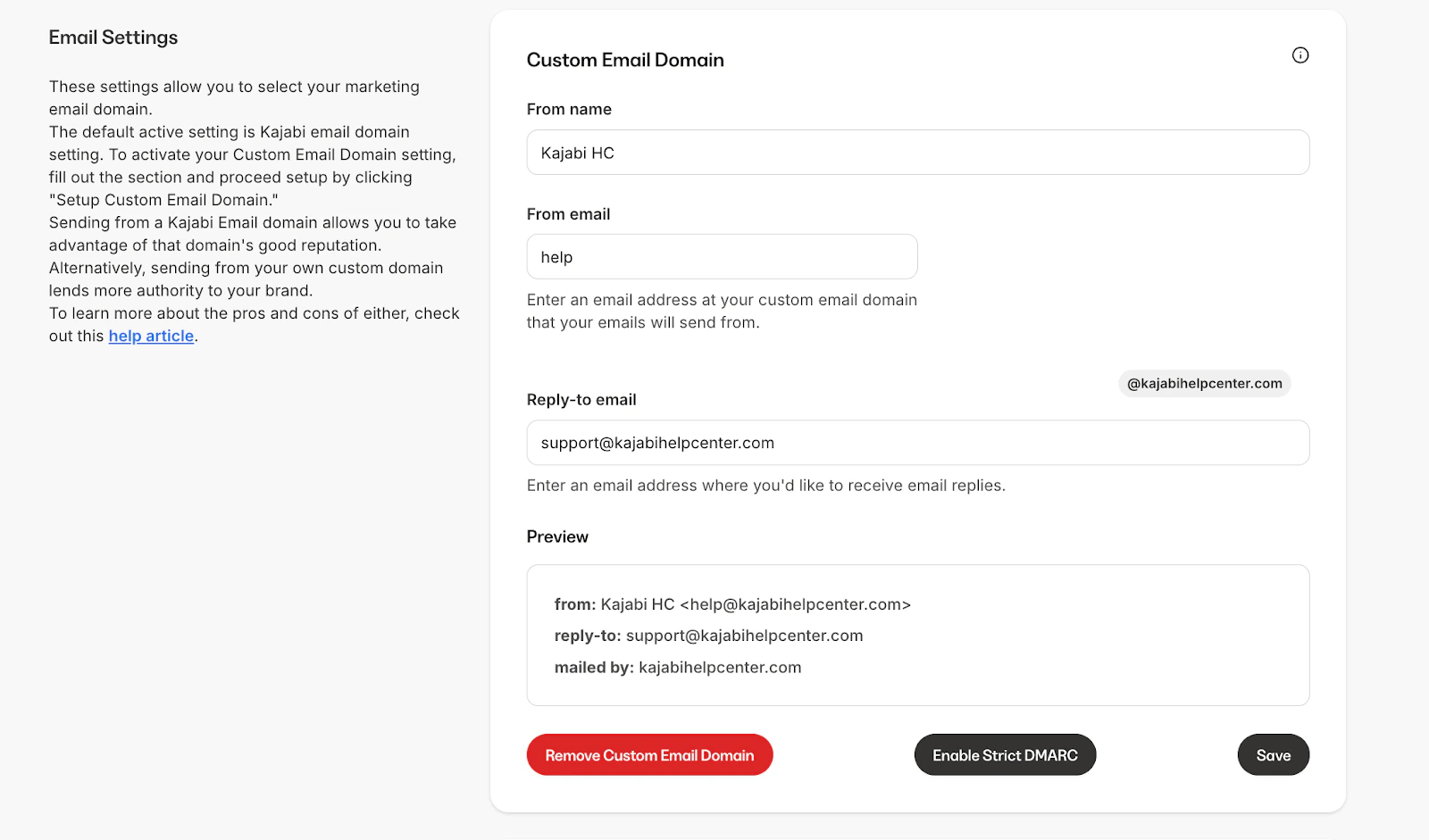
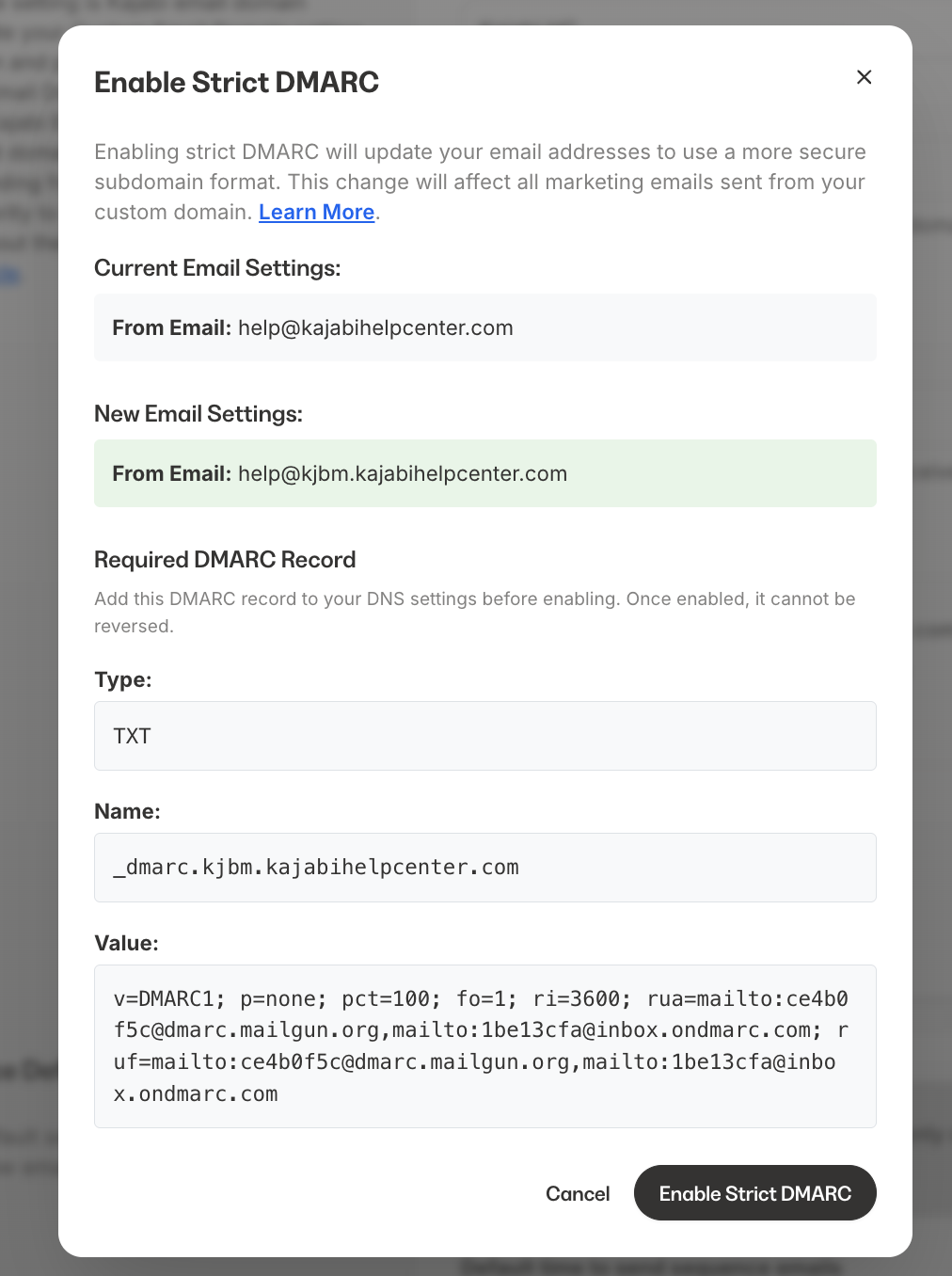
- Go to your DNS provider and add the required DMARC information. Follow the instructions in this guide: Add a DMARC Record to Your DNS.
- Wait for DNS propagation. This process typically takes 5 minutes, but it can take up to 48 hours.
- Return to Kajabi and select Enable Strict DMARC to confirm that your DNS has propagated.
- Once propagated, Kajabi will display Strict DMARC Enabled.
Setting up alongside Google Workspace or Microsoft 365
If you already use Google Workspace or Microsoft 365 for your regular business email on the same domain, keep the two setups separate to avoid MX record conflicts:- Don’t remove your existing Google Workspace or Microsoft 365 MX records when you add Kajabi’s DNS records, Kajabi’s records use the kjbm subdomain specifically so they don’t collide with your existing mail setup.
- Double-check record priority if you use MX records for both services: your primary business email MX records (Google Workspace or Microsoft 365) should keep their existing priority values. Kajabi’s MX records are scoped to the kjbm subdomain and shouldn’t need to compete for priority on your root domain.
- If you see a TXT record verification loop, confirm you added Kajabi’s TXT records under the exact host/name value shown in your Kajabi setup screen, not your root domain, a TXT record entered against the wrong host is the most common cause of a verification loop when a domain also has Google Workspace or Microsoft 365 records present.
- If records look correct on both sides and verification still loops after 48 hours, contact Kajabi Support, this can indicate a backend provisioning issue rather than a DNS mistake.