

Keep your billing information up to date to ensure uninterrupted access to your Kajabi account. You can update your payment method and billing address from the Subscription & Billing page in your account settings.Documentation Index
Fetch the complete documentation index at: https://help.kajabi.com/llms.txt
Use this file to discover all available pages before exploring further.
Update a payment method
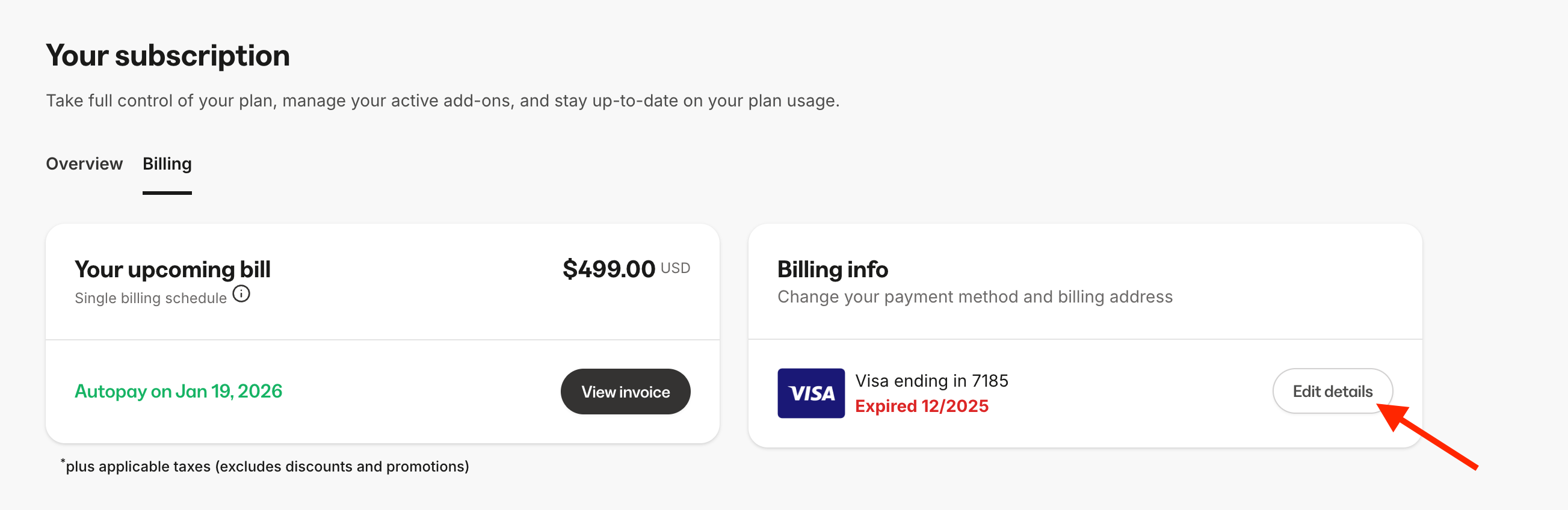
- Go to Settings > Subscription & Billing.
- Click on the Billing tab.
- Under Billing info, click Edit details.
- Click the 3 dots next to your current payment method > Edit payment method.
- Enter your card details.
- Click Save changes.
Note:
- Kajabi only accepts payment by debit or credit card.
- If you have an active Kajabi subscription or are trialing, you must have at least one payment method.
- If you cancel your account and wish to remove your payment method, you can contact our support team.
Update a billing address
- Go to Settings > Subscription & Billing.
- Click on the Billing tab.
- Under Billing info, click Edit details.
- Click Edit business address.
- Update your billing address. You can also update your tax type and number (learn how taxes work).