

Duplicate an Offer to create pricing tiers, give more pricing options, or create payment plans, bonus Offers, duplicate Offers with different currencies, and more.Documentation Index
Fetch the complete documentation index at: https://help.kajabi.com/llms.txt
Use this file to discover all available pages before exploring further.
Why duplicate an Offer?
Duplicating an Offer can provide customers with multiple options for purchasing, from creating multiple pricing tiers with different Product packages to building unique sales pages specific to your business. Here are a few examples of how you can use duplicated Offers:- Create “Choose what you pay” or “Donate” sales pages
- Provide different currency options
- Give your customers different pricing options
Duplicate an Offer
- Open the Sales tab from your Dashboard
- Then, click Pricing
- Locate the Offer you want to duplicate and click the
…icon - Select Duplicate
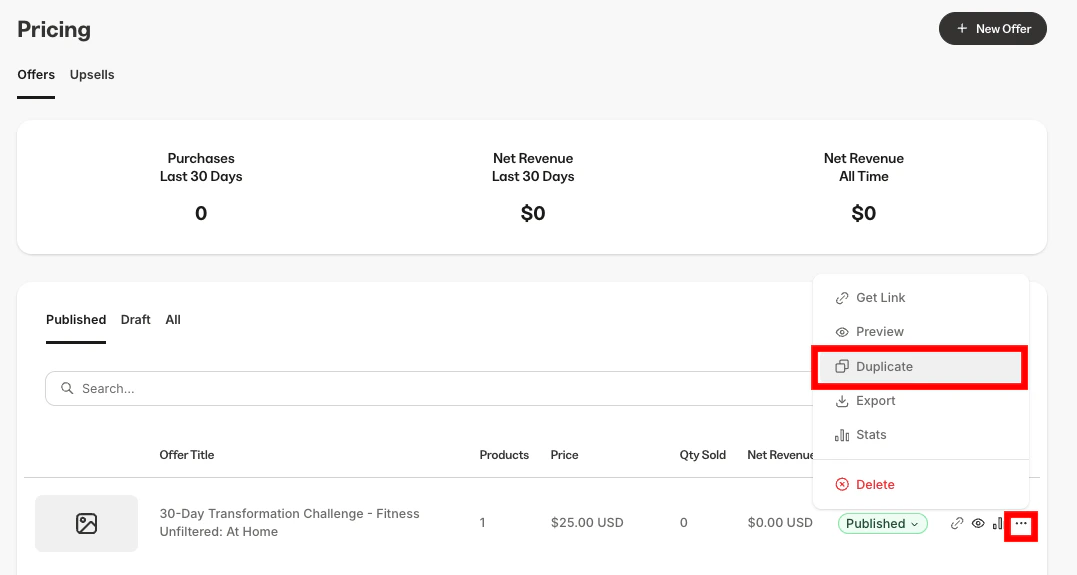
- After duplicating, click the Offer title to edit its details, Products, and other settings
- Be sure to click Save to keep your changes
Note: If the original Offer is attached to a coupon, your duplicated Offer will also be connected to the coupon.
Duplicate an Offer with Automations
Add one of many different types of Automations to Offers so that the selected Automation action is performed immediately after an Offer is purchased. Read more about Kajabi Automations. After creating an Offer with Automations, you can duplicate it.Add an Automation to an Offer
- From your Kajabi Dashboard, select the Sales tab
- Under Pricing, select the Offer you wish to edit
- Click the Purchase flow tab
- Scroll down to the Automations section
- Click +Add Automation
- Using the Then drop-down menu, select the Automation action to be performed when the offer is purchased
- If your Kajabi plan includes Advanced Automations, you may choose to Add Conditions to the Automation
- Click Save to complete the Offer Automation setup process
Duplicate an Offer and its Automations
- Open the Sales tab from your Dashboard
- Then, click Pricing
- Locate the Offer you want to clone and click the
…icon - Select Duplicate
- Click the Copy Automations checkbox
- Press Duplicate to Duplicate the Offer and its Automations